Goal
The model server in this part answered requests one at a time. Training and data preparation work differently: one job is split into many tasks that run in parallel on many machines. Ray is a common way to run that kind of work on a cluster, and KubeRay is the operator that runs a Ray cluster on Kubernetes.
I wanted to run a Ray cluster on the lab’s k3s cluster, time a CPU-bound pipeline with one, two and three workers, and see what happens when a worker disappears in the middle of a run.
This is the third post in Part 4. There are no GPUs here and the three VMs share one physical host, so the numbers describe this lab only.
Terms used in this post
These build on the earlier glossaries.
- Ray: a framework for running Python functions as tasks spread over many machines.
- Task: one function call that Ray runs on any worker with a free slot.
- Head node: the Ray process that tracks the cluster and takes the job. Workers connect to it.
- Worker: a Ray process that runs tasks. Each one advertises a number of CPU slots.
- Operator: a program that watches a custom Kubernetes object and creates or changes pods to match it. KubeRay is one.
- Custom resource: an object type added to Kubernetes. Here, a
RayCluster. - Object store: shared memory on each Ray node where task results are kept until someone reads them.
- Speedup: the time of the baseline divided by the time of the run.
What I built
Each VM went from 3 GB to 5 GB of memory first. The nodes were already 53% to 74% used with Prometheus, MinIO and the model server, and Ray adds a head and three workers. I did not test whether Ray would have fit in 3 GB. I shut each VM down one at a time, changed its memory at the hypervisor and started it again, and each came back Ready in Kubernetes and idle in Slurm without any manual step.
Then I installed the KubeRay operator, version 1.2.2, from its manifests and created one RayCluster:
- The head pod runs on
slurm-ctlwith zero CPU slots, so it only coordinates. - The worker group has one pod per node, spread by a topology spread constraint. Each worker has two CPU slots, a CPU request of 1000m and a memory limit of 1800 Mi. The third worker therefore shares
slurm-ctlwith the head, the k3s server and the Slurm controller. - The image is the public
rayproject/rayimage for Ray 2.40.0, which I could pull from Docker Hub. The pull took about 27 seconds on one node, and I pulled it on every node before the runs. - The model server from the earlier post was scaled to zero replicas for these runs, so it did not compete for CPU.
 Diagram: the head on
slurm-ctl and one worker on each of the three nodes.
How it works
I created the RayCluster object and the operator turned it into pods: one head and the number of workers I asked for. To scale, I change the worker count in the object and the operator adds or removes pods.
The pipeline script runs inside the head pod. It splits the work into 48 partitions. Each task builds 400,000 synthetic web server log lines from a seed, parses each line with a regular expression, and returns a small summary: counts by status code and path, and the sum of bytes. The script merges the 48 summaries. Because every task builds its own lines, the test measures CPU work spread over workers and not data transfer. All the runs processed 19,200,000 lines and gave the same totals, including the same byte count of 480,979,059,362.
Commands and results
Scaling workers. The baseline is the same function run in a plain loop inside the head pod. For the Ray runs I timed from after the connection to the cluster until the merged result came back. Each row is every run I did, in seconds.
| Setup | CPU slots | Runs (s) | Mean (s) | Speedup over the baseline |
|---|---|---|---|---|
| Plain loop in the head pod | 1 | 54.5, 54.5 | 54.5 | 1.0 |
| 1 worker | 2 | 32.0, 30.0, 31.9 | 31.3 | 1.7 |
| 2 workers | 4 | 19.4, 18.5, 18.7 | 18.9 | 2.9 |
| 3 workers | 6 | 15.1, 15.4, 14.7 | 15.1 | 3.6 |
Doubling the slots did not halve the time. Six slots gave 3.6 times the speed of the baseline, where perfect scaling would give 6. Two likely reasons are that the nodes have two vCPUs each, so Ray’s own processes compete with the tasks, and that the third worker shares a node with the head, the k3s server and the Slurm controller. Runs of the same setup were within about two seconds of each other.
Adding a worker. I raised the worker count from one to two, and then to three. The new worker was running 22 seconds after the first change and 23 seconds after the second. The image was already on every node, so a first pull would add to that.
A worker killed during a run. With three workers, I started the pipeline and force-deleted the worker on lab-node1 eight seconds in. The run still finished with the same line count and byte total. It took 17.4 seconds, against 13.9 seconds for an uninterrupted run just before it. The extra 3.5 seconds fit Ray running the tasks from the lost worker again, and Ray’s task fault tolerance documentation says that when a task fails because the machine failed, Ray reruns it until it succeeds or the retry limit is exceeded, with a default of 3 retries. The operator created a replacement and all three workers were running again 24 seconds after the deletion. I did this once.
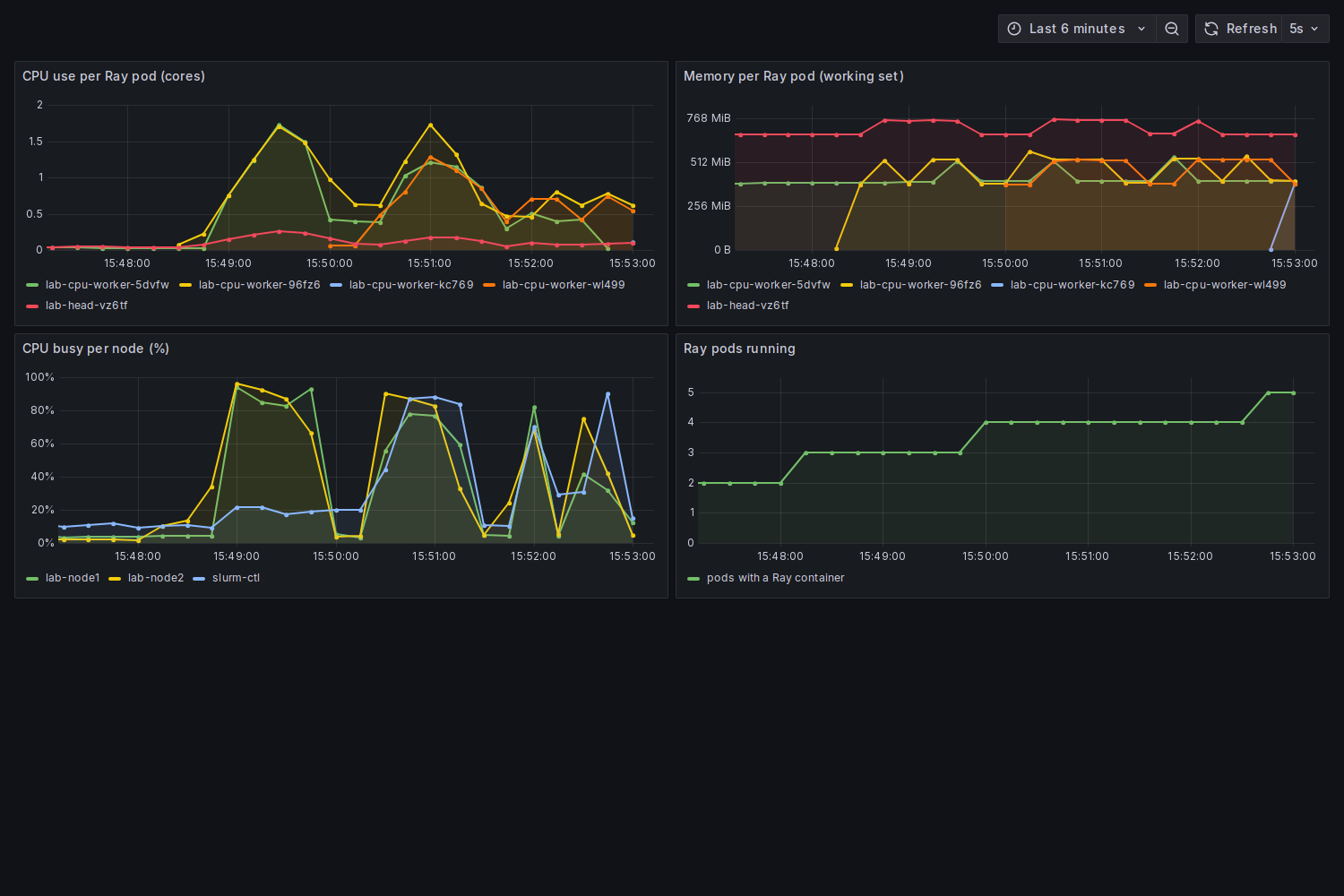 Screenshot: the runs with two and then three workers, and the killed worker at the end. The top left panel shows CPU use per pod, the top right shows memory per pod, and the lower left shows how busy each node was.
Resources. In the dashboard the head used about 650 to 770 MiB of memory and under a third of a CPU, and each worker used about 400 to 520 MiB while it was working.
Challenges
- Capacity accounting stopped a worker from scheduling. My first worker pod stayed
Pendingwith “Insufficient cpu”. Each node has two CPUs and already had 620m to 820m of requests from the monitoring stack, MinIO and the model server, so a 1500m request fit nowhere even though the nodes were mostly idle. Kubernetes places pods by requests, not by use. I lowered the request to 1000m and scaled the model server to zero. In a fleet this is the difference between what a node can do and what the scheduler lets you ask for. - Scaling was less than linear. Six slots gave 3.6 times the baseline. When you plan capacity for a fleet, use a measured speedup curve and not the slot count. I measured only up to three workers.
- Where the head runs is a failure domain. The head sits on the control-plane node with a worker. I killed a worker, not the head. I did not test losing the head, and Ray keeps cluster state in the head unless it is set up otherwise, so I cannot say what the lab would do.
What this lab cannot show is a real network between nodes, many more workers, large datasets that spill out of the object store, or GPU workers.
Differences with a production setup
- Scale and hardware. Three small VMs on one host, with a virtual network, against hundreds of machines with GPUs and a fast fabric.
- Autoscaling. I changed the worker count by hand. KubeRay can run Ray’s autoscaler to add and remove workers with the queue of tasks, and I did not enable it.
- Head reliability. A production cluster would protect the head, for example with GCS fault tolerance and an external store. I did not set that up.
- Data. A real pipeline reads a dataset from storage, often with Ray Data. My tasks generated their own data, so the object store was barely used. I set it to 300 MB per node and did not test spilling to disk.
- Scheduling next to other systems. In a shared cluster, Ray and Slurm or other tenants would have separate quotas. Here Ray shares the nodes with Slurm and everything else, and neither scheduler knows about the other.
- Queueing and gang scheduling. A shared cluster usually puts a queue in front of batch work. Kueue does this with quotas inside Kubernetes, and NVIDIA’s KAI Scheduler schedules GPU workloads, including groups of pods that must start together. I used neither.
- Node provisioning. With the Ray autoscaler on, workers also need nodes to land on, which a node provisioner such as Karpenter supplies in the cloud.
FAQ
What is the difference between Ray and Slurm?
Slurm queues jobs against requested resources and starts them. Ray runs inside an allocation you already have, and spreads the tasks of one program over it. They answer different questions, and a Ray cluster can run on nodes that Slurm or Kubernetes handed out.
What is KubeRay?
An operator that adds a RayCluster object to Kubernetes. You describe a head and groups of workers, and it creates the pods and replaces them when they disappear.
What is the difference between a task and an actor?
A task is a function call that runs once and returns. An actor is a Python object that lives on one worker and keeps state between calls. I used only tasks.
Why does the head have zero CPU slots?
So that no task is placed on it and it stays free to coordinate the workers. Here it also shares a node with a worker, which is the opposite of an ideal layout.
Why did the killed worker’s tasks still finish?
Ray runs a task again on another worker when the worker it was on is lost, up to a retry limit, as its documentation describes. I used the default limit.
Next
Take the quiz to test your understanding: Part 4 quiz
Part 4 continues with infrastructure as code: rebuilding the lab from files kept in git.
Comments