3 Industry usedone · reading only
6 Bare metaldone
Emulated BMCs·Rack power plan·Drift and burn-in·NetBox inventory·Hardening and Secure Boot·Network boot with PXE·RAID and management network
7 Cloud + GPUemulated done · real run pending
AWS autoscaling·GPU fleet monitoring·GPU scheduling·NUMA topology
Goal
Part 7 is about the cloud and GPUs. A cloud makes capacity something you request in code, and an autoscaling group is the basic tool for it: you describe the machines you want, set limits, and the service keeps the right number running and replaces ones that die. For GPU workers that matters even more, because the machines are expensive and the right number changes through the day.
Real GPU machines cost money, and I am not spending any in this part. So the first post builds the group in Terraform and applies it to a local emulator of the AWS API. The emulator is not AWS, and the post says where it differs. It shows the code, the scaling behavior I could test, and what has to be repeated against a real account later.
Terms used in this post
- Autoscaling group: a managed set of instances with a minimum, maximum and desired size, kept at the desired size by the service.
- Launch template: the description of one instance: image, instance type, network settings.
- Scaling policy: a rule for how to change the desired size, for example add two instances.
- Scheduled action: a change of limits at a set time, for example a lower floor at night.
- Cooldown: a period after a scaling action in which the group does not scale again.
- Availability zone: a separate failure domain inside a region. A group is usually spread over several.
- Emulator: a program that answers the cloud API and keeps its own state, without any real machines behind it.
- Provider: the Terraform plugin that talks to one kind of API, here AWS.
- Drift: a difference between what Terraform recorded and what the system now has.
- Quota: a limit that the cloud puts on how much of a resource an account may use.
What I built
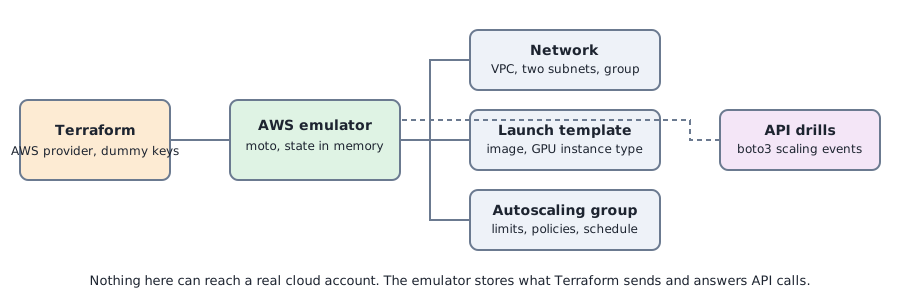
- A network. A VPC with two subnets in two availability zones and a security group that allows SSH only from inside the VPC.
- A launch template. An image id and a GPU instance type, g5.xlarge, with a tag on every instance.
- An autoscaling group. A minimum of 2, a maximum of 6, a starting size of 2, spread over the two subnets, using the launch template.
- Two scaling policies and a schedule. One policy adds two instances, one removes one, and a scheduled action drops the floor to zero at 02:00.
- A drill script. It calls the AWS API with boto3 to trigger the policies, terminate an instance, ask for an impossible size and read back the state.
How it works
The Terraform code is what I would use against a real account. The only parts that point at the emulator are the provider settings: dummy credentials, the checks that call the real service turned off, and the service endpoints set to a local address. Changing those and the image id would point the same code at AWS.
The emulator is moto, a Python library that serves the AWS API and keeps its state in memory. It creates the VPC, the subnets, the launch template and the group, and when a group is created or resized it creates the matching instances in its own list. No instance runs and no load is simulated, so nothing scales by itself. Every scaling event in the drill is started by an API call, the way an autoscaler or a person would start it.
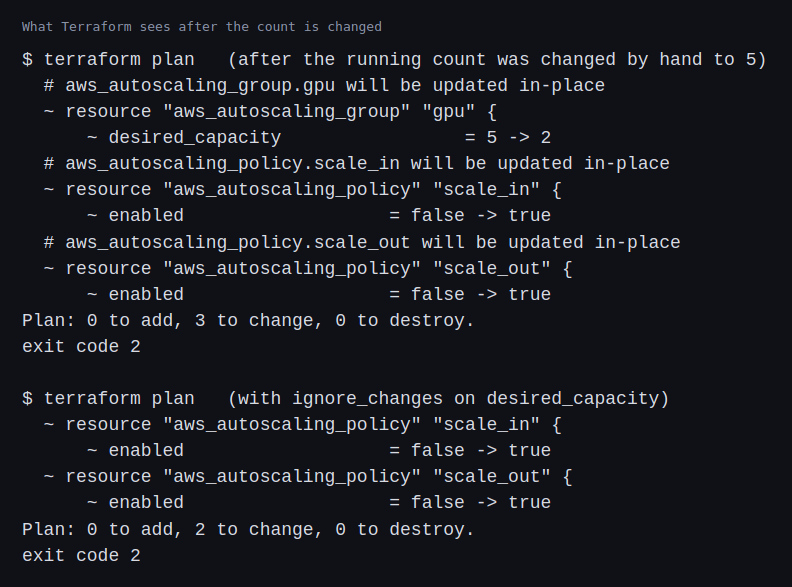
The group’s size is a decision shared between two owners. Terraform owns the limits, the minimum and the maximum. A scaling policy owns the running count. If Terraform also manages the desired count, the next apply resets whatever the autoscaler decided.
Commands and results
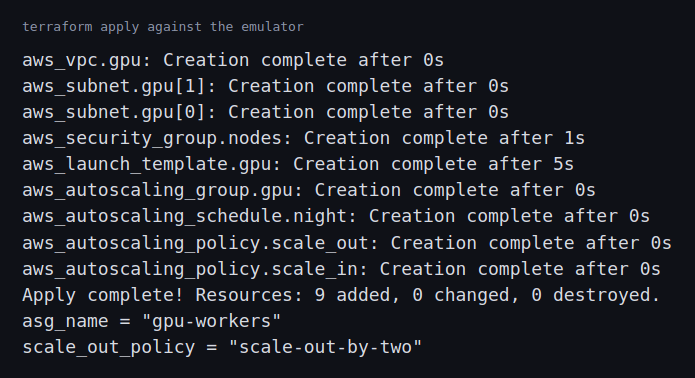
Terraform created nine resources in one apply against the emulator: the VPC, two subnets, the security group, the launch template, the group, the two policies and the schedule.
The drill started with two instances. The scale-out policy took the group to four. I terminated one instance without lowering the desired count, and the group came back to four instances without the terminated one. The scale-in policy took it to three. I then asked for a desired size of nine, above the maximum of six, and the emulator accepted it and listed nine instances. The scheduled action was recorded with its recurrence and a floor of zero.
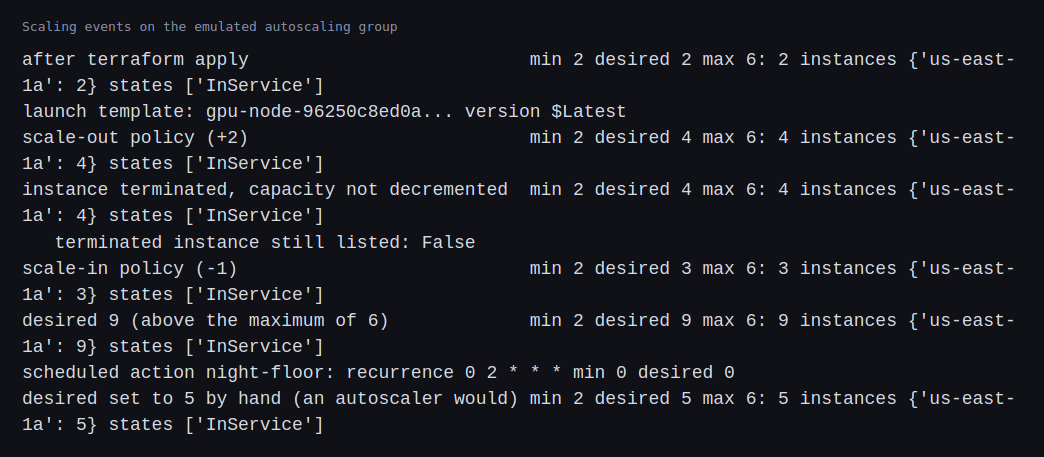
Two of those results are not what I expect from the real service, which is why this is only an emulation. All the instances were placed in one availability zone even though the group had subnets in two, and a size above the maximum was accepted. I expect the real service to spread instances across zones and to reject the size, but I did not test it.
Then the drift. I set the desired count to five by hand, as an autoscaler would. Terraform’s next plan wanted to put it back to two. Adding an instruction to ignore changes to the desired count removed that change from the plan. The two remaining changes are an emulator artifact: it does not return the enabled flag of the policies, so Terraform thinks they are disabled.
Challenges
- Two owners for one number. The first plan after a scaling event wanted to undo it. That is how a capacity decision can be reverted by a routine apply, and the fix is a rule about who owns what, written into the code.
- The emulator accepts what the service would refuse. A size above the maximum went through, and the zone balance was missing. A test that passes against an emulator has not shown that the real call works, so what this post shows is the code and the API calls, and not how AWS behaves.
- Nothing scales by itself here. A real group reacts to metrics, with cooldowns and warm-up times. The drill used calls, so it says nothing about how fast or how stable the scaling is.
- GPU capacity is a separate problem. The group asks for an instance type that a real account may not be allowed to launch, or that a region may not have in a zone. Quotas for GPU families are usually separate and low at first, and a launch can fail for lack of capacity even with a high quota. That is an account and a region problem, and an emulator cannot show it.
- State only lives as long as the emulator. Restarting it forgets everything, so the Terraform state and the emulator can disagree.
Differences with a production setup
- Real service. The group, its launch template and policies are described in the EC2 Auto Scaling documentation. The Terraform resource I used is documented for the AWS provider.
- Scaling policies. Production groups usually scale on a metric with target tracking, and use warm pools to cut start-up time. I used two simple policies and called them by hand.
- Kubernetes. For a cluster, the node count is often managed by a Kubernetes-aware tool such as Karpenter, which launches instances for pending pods instead of resizing a group.
- Emulators. The moto documentation lists which operations it supports and how faithfully. LocalStack is another emulator with a different scope. Neither replaces a test on a real account.
- Cost and safety. A real account needs budgets and alerts, a cap on the group’s maximum, a plan to tear everything down, and permissions narrow enough that a bad apply cannot create a large bill.
- Other features. Mixed instance types, spot capacity, instance refresh and lifecycle hooks are what production groups rely on. I did not exercise any of them.
FAQ
What does an autoscaling group do that a script that starts instances does not?
It keeps the count at the desired size: it replaces an instance that is terminated or unhealthy, spreads instances across zones, and applies policies and schedules. In the drill, a terminated instance was replaced without any call to start one.
Why separate the limits from the running count?
So that the autoscaler can change the count without Terraform undoing it, and Terraform can change the limits without fighting the autoscaler.
Why use an emulator at all?
To test code and API calls without spending money or risking a real account. It catches mistakes in the Terraform and in the scripts, and shows nothing about the real service’s behavior.
What is a scheduled action for?
Changing limits at a known time, such as a lower floor at night when GPU jobs are not expected. It saves money without waiting for a metric.
What would change to run this against a real account?
The provider settings and credentials, the image id, an instance type the account may launch, and a budget and a teardown plan. The group and its policies would stay as they are.
What will change the most between the emulator and real AWS?
The limits of the service. The real service enforces the size and zone rules that the emulator accepted, applies quotas, can run out of capacity, and charges for what runs.
Repeating with real hardware
Coming soon. When I run this against a real account, with a spend cap agreed beforehand, I will apply the same Terraform with real credentials and a launchable image, check how the group spreads over zones, whether it refuses a size above the maximum, and how long a scale-out takes, and then tear it down and confirm that billing has stopped.
Next
Take the quiz to test your understanding: Part 7 quiz
Part 7 continues with monitoring a fleet of GPU machines, starting with an emulated exporter.
Comments