Goal
A server that arrives from the factory has an empty disk and no operating system. Nobody walks up with a USB stick to a rack of fifty of them. The usual answer is network boot: the machine asks the network what to run, an installer comes down the wire, and the machine installs itself from a written set of answers.
I wanted to build that on a small scale and time it. The plan was a separate network for it, a server that hands out addresses and boot files, an unattended install, and two blank VMs started together. This is the first pass with emulation. The VMs boot over a virtual network with a BIOS network boot, so it shows the sequence and the timing, and says nothing about real network cards, switches or UEFI network boot.
Terms used in this post
- PXE: the preboot execution environment, a way for a machine’s firmware to boot from the network.
- DHCP: the service that gives a machine an address, and can tell it where to find a boot file.
- TFTP: a very simple file transfer protocol that firmware can speak before anything else is running.
- Boot loader: the first program the machine runs after the firmware. Here it is pxelinux.
- Initramfs: a small root file system loaded with the kernel, which holds the installer here.
- Preseed: a file of answers that lets the Debian installer run without anyone typing.
- Provisioning network: a network used only to install new machines, kept apart from the rest.
- NAT: network address translation, here used to let machines on the isolated network reach the internet through the server.
- Reservation: a DHCP setting that always gives a particular machine the same address.
- Commissioning: the step in a bare-metal tool where a new machine is inspected and recorded before it is given a job.
What I built
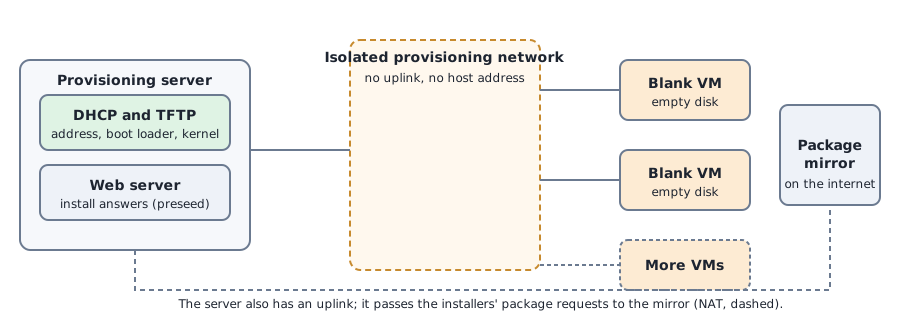
- An isolated network. A new virtual bridge with no physical port and no address on the host, so that nothing on it can reach the home network or be reached from it.
- A provisioning server. One small VM with a leg on the home network and a leg on the isolated one. It runs DHCP and TFTP for the boot files, a web server for the install answers, and NAT so installers can reach the package mirror.
- Install answers. A preseed file that sets the language and clock, partitions the first disk, installs a small system plus SSH, creates a login with a key and no password, and removes the need for anyone at a keyboard.
- Reserved addresses. Each blank VM has a fixed MAC address, and the server gives it the address that matches its VM number.
- A timed run. A script that starts two blank VMs together, polls them over SSH through the server, and keeps the logs.
How it works
The blank VM has an empty disk and a boot order of disk first and network second. The firmware finds nothing bootable on the disk and tries the network. It broadcasts a DHCP request, and the server replies with an address and the name of a boot file. The firmware fetches the boot loader over TFTP, the boot loader fetches the kernel and the installer image, and the kernel starts.
The installer starts without a keyboard because the boot loader passes it a few words of options, including where to find its answers. It asks DHCP for its own address, fetches the answers over HTTP, partitions the disk, downloads packages from the Debian mirror through the server’s NAT, installs a boot loader on the disk, adds the key, and reboots. The second boot finds a bootable disk and starts the new system.
The isolated network matters. A DHCP server on a shared network answers every machine that asks, and a second one can take a whole network offline. A bridge with no uplink makes that impossible, and the server’s NAT is the only way out. The server is also the way in: the new machines have addresses only on the isolated network, so I reach them through the server as a jump host.
I chose the boot order on purpose. A machine that tries the network first would reinstall itself at every boot unless the server told it to boot locally. With the disk first, a blank disk falls through to the network and an installed disk boots. I did not test the other order.
Commands and results
I ran the whole thing twice from blank disks. In the run I timed, the two VMs were started together, and the table shows when each step reached the server’s logs.
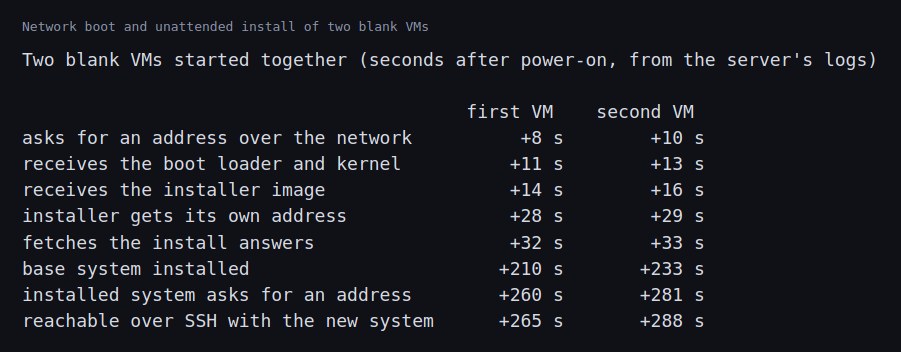
The first VM was asking for an address 8 seconds after it was powered on, had its boot loader and kernel within 12 seconds, and was fetching its install answers after 32 seconds. The install itself was the long part: the base system was installed 210 seconds after power-on on the first VM and 233 seconds on the second. The installed systems then asked for addresses at 260 and 281 seconds, and were reachable over SSH with a fresh Debian 12 system at 265 and 288 seconds, a little under five minutes each, with nobody at a keyboard. The first run had similar numbers, with the install answers fetched at 33 seconds and the base system installed at 224 and 228 seconds. I did not time SSH in that run.
The second VM took 23 seconds longer than the first in the install stage. Both were fetching packages through the same server at the same time, which is one possible cause. I did not test it.
Everything the new machines needed came from the server. The same server and answers would install a third or a thirtieth machine without any change, apart from a reservation if I want the address to match the VM number.
Challenges
- Two DHCP servers is an outage. The server hands out addresses to anything that asks. On the home network that would compete with the real router. Isolation is what makes it safe to try, and a real data center needs the same separation for its provisioning network, or careful relays and filters.
- A machine with no address on your network is hard to reach. The new machines were reachable only through the server. The path in is part of the design, and a provisioning server that is down takes the way into every new machine with it.
- The package mirror is a shared dependency. Every installer pulled its packages through one link, and the second finished later than the first. Many machines at once need a local mirror or a cache.
- Every machine is identical until it is named. The installer gave each machine the same answers, so identity came from the reservations. A real fleet needs a source of truth to decide which machine becomes what, which is what the inventory post and a tool like MAAS are for.
- The answers file is part of the security of the fleet. It contains no password. It sets key-only login for one account and passwordless sudo, which suits a lab and would need a decision in production.
Differences with a production setup
- Tools. Production bare-metal fleets use a tool that discovers, inspects and deploys machines, such as MAAS, OpenStack Ironic or Foreman. They also control power through the BMC. I used a plain DHCP and TFTP server and one answers file.
- Boot firmware. Modern machines use UEFI network boot, often through iPXE, which can fetch over HTTP instead of TFTP. I used the older BIOS path with pxelinux. The Debian installer’s own preseed documentation covers the answers file.
- Servers. dnsmasq is a good small DHCP and TFTP server. Larger sites run redundant DHCP servers with relays on their switches.
- Images. Many fleets deploy a prepared disk image, with cloud-init for the last bits, instead of running an installer on every machine. That is faster than an install.
- Boot control. Instead of a boot order that falls through to the network, production tools set a one-time network boot through the BMC, so a machine boots from the network exactly once.
- Hardware. Real network cards, switches, long cable runs and firmware differences each bring their own failures, and none of them is present here.
FAQ
What is PXE?
A way for a machine’s firmware to boot from the network. The firmware asks DHCP for an address and a boot file, fetches the file over TFTP and runs it.
Why does the installer ask for an address twice?
The firmware’s network boot gets the machine as far as the boot loader and the kernel. After that the installer is a separate program with its own network setup, so it asks again.
Why a separate network for provisioning?
So that the DHCP server cannot interfere with the real network, and so that machines being installed cannot reach or be reached from anything else.
Why is the first machine ready before the second?
Both did the same steps. The second finished the install stage 23 seconds later. They shared one server and one link for their packages, which may be the reason, but I did not check.
Why does a real fleet set the boot order through the BMC?
So that a machine boots from the network once, for an install, and then boots from its disk. A fixed order that puts the network first would reinstall it at every boot.
What will change the most between this small setup and a real fleet?
Firmware and the network. Real machines differ in how they run UEFI network boot, they go through real switches, and hundreds of them boot at once, so the timing and the failures at that scale will differ most.
Repeating with real hardware
Coming soon. When I have real servers, I will repeat this on a real network with a real switch, set a one-time network boot through the BMC, try UEFI network boot, and compare the timing with the numbers here.
Next
Take the quiz to test your understanding: Part 6 quiz
Part 6 continues with software RAID and the management network.
Comments