Goal
Through Part 4 I changed the cluster with kubectl, Ansible and Terraform from my own machine. That works for one person. A shared cluster usually wants a record of every change, a review before it applies, and a way to put it back. GitOps does this by making a git repository the description of what should run, with a controller inside the cluster that keeps the cluster equal to it.
I wanted to run Argo CD against a repository in the lab’s git server, and measure what happens when I change the repository, change the cluster by hand, delete an object from git, and push a bad commit. This is the third post in Part 5, the platform layer. The lab has three small nodes and one application, so the numbers describe that.
Terms used in this post
These build on the earlier glossaries.
- GitOps: running a system from a description kept in git, with a controller that applies it and corrects differences.
- Reconciliation: comparing what is described with what exists and changing the second to match the first.
- Application: Argo CD’s object that names a repository path and a destination in the cluster.
- Sync: applying the repository’s state to the cluster.
- Self-heal: automatically undoing changes made directly in the cluster.
- Prune: deleting cluster objects that are no longer in git.
- Drift: a difference between git and the cluster.
- Rollback: returning to an earlier state. In GitOps it is a new commit.
What I built
- A repository. A new private repository in the lab’s git server holds one application,
apps/hello: a namespace, a ConfigMap with a web page, a Deployment of two nginx pods and a Service. - Argo CD. Version 3.5.7, installed from its release manifest in 45 seconds. It runs seven pods, and together they used about 190 MiB of memory when idle.
- Access. Argo CD reads the repository with a read-only access token, stored as a Secret in the cluster. It cannot push.
- The Application. It follows the
mainbranch and theapps/hellopath, with automatic sync, prune and self-heal turned on.
 Diagram: a commit in git, Argo CD comparing and applying, and the cluster, with changes made by hand put back.
How it works
Argo CD fetches the repository and renders the manifests under the path. It compares them with the live objects and, with automatic sync on, applies the difference. It also watches the cluster, so a change made there shows up as a difference without waiting for the next fetch. By default it fetches from git every three minutes, and a webhook from the git server can trigger a fetch at once. I did not set up a webhook. For the faster runs below I asked Argo CD for a refresh after each push, which is what a webhook does.
Commands and results
Each drill was run once.
| What I did | What happened |
|---|---|
| Created the Application | Synced and healthy about 6 seconds later, with two pods |
| Pushed a change: replicas 2 to 3 and a new page | Applied 214 seconds after the push, because of the three-minute fetch interval |
| Scaled the Deployment to 5 by hand | Back to its git value within about a second (I sampled once a second) |
| Edited the ConfigMap by hand | Restored 8 seconds later |
| Removed the Service from git | The Service was deleted within a few seconds of the push and refresh |
| Put the Service back | Recreated within about 2 seconds |
| Pushed an image tag that does not exist | A new pod went to ErrImagePull while the two old pods kept running. After 60 seconds Argo CD showed the application as synced and progressing, not failed |
| Rolled back with a new commit | Healthy again about 2 seconds after the push |
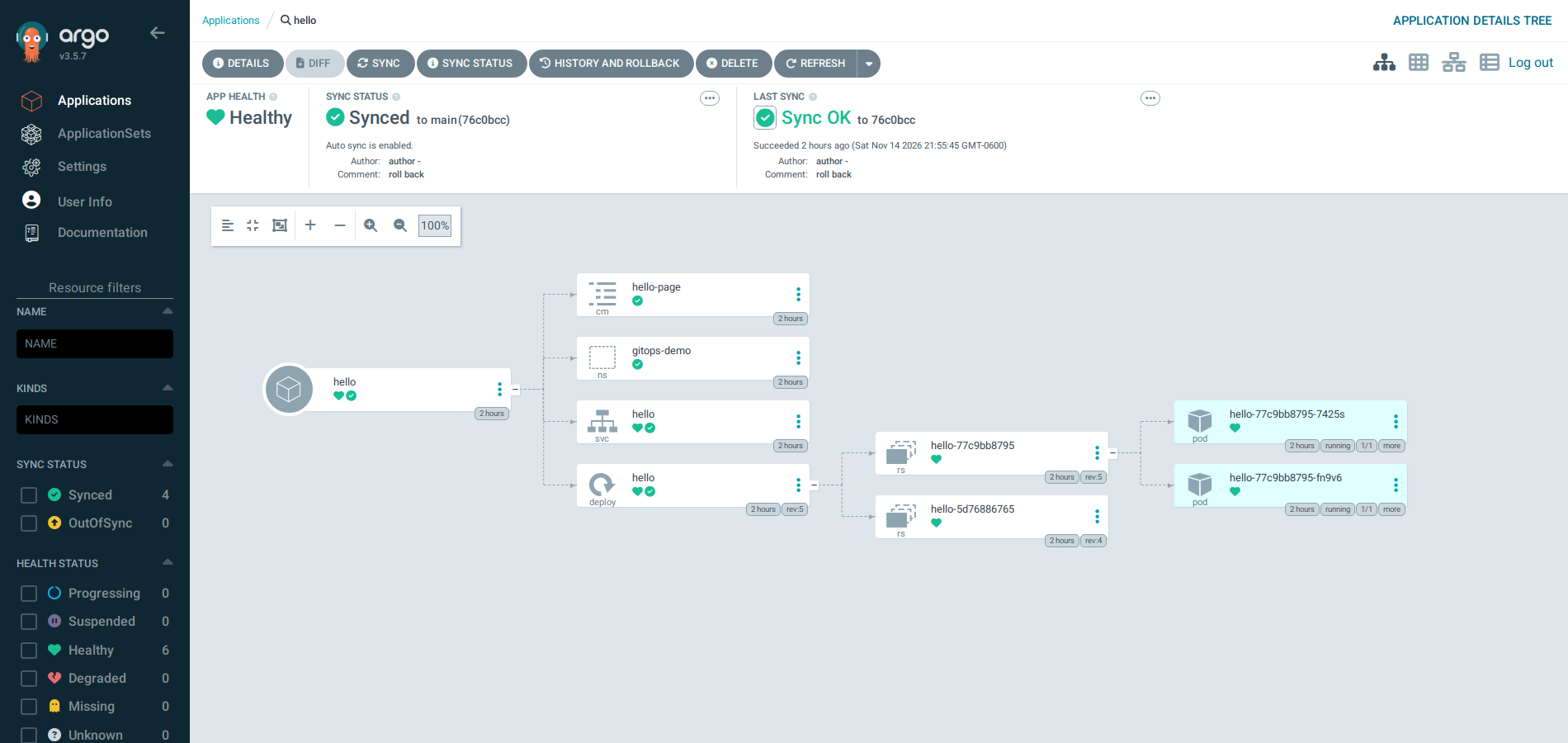 Screenshot: the Argo CD view of the application in its good state. The namespace, ConfigMap, Service and Deployment are healthy, with a ReplicaSet and two pods under the Deployment.
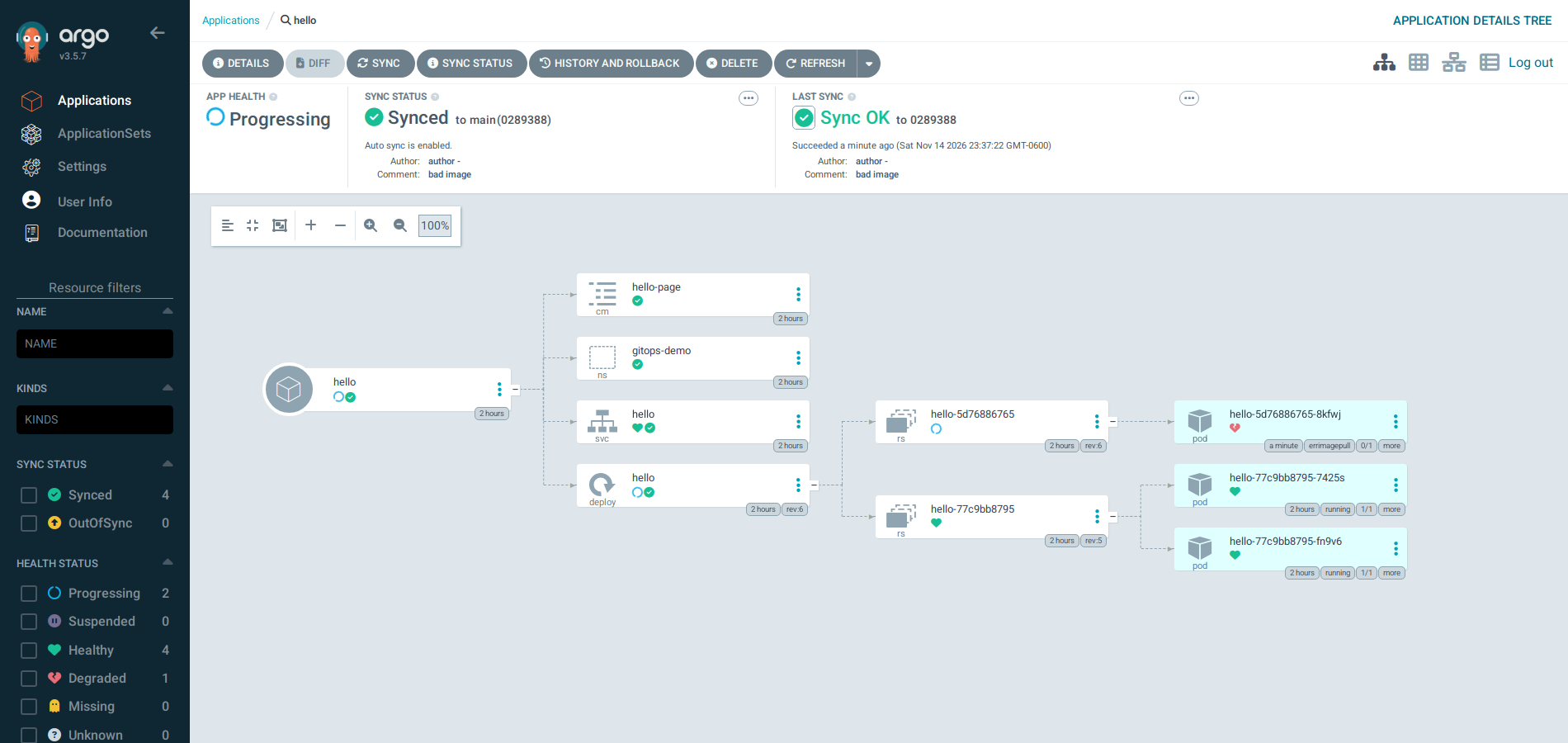 Screenshot: about a minute after pushing an image tag that does not exist. The application is synced to the bad commit and its health is Progressing. The new ReplicaSet has a pod in
ErrImagePull, and the two old pods are still running.
Challenges
- Git is the truth, but not immediately. A change took 214 seconds to appear with the default fetch interval. During an incident, waiting almost four minutes for a fix to land is a long time, so a webhook or a manual refresh is part of the setup, not an extra.
- Self-heal fights anyone changing the cluster by hand. Within a second, my emergency scale-up to 5 replicas was undone. That is the intended behaviour and also a surprise for an on-call engineer. It also means a field that something else manages, such as the replica count under an autoscaler, needs care. I did not test an autoscaler against git.
- A bad commit does not look like a failure at first. The rolling update kept the old pods serving, and the application showed as progressing. A broken change is contained, but it only becomes loud when the deployment’s progress deadline passes or an alert fires on the unready pod.
- Rollback is a new commit. The history keeps both the bad change and the fix, which is the record I wanted. It also means the previous state has to be correct in git, because it is restored exactly.
- The credential lives in the cluster. The read-only token is an ordinary Secret. It can only read one repository, but it is not encrypted beyond what the cluster does.
What this lab cannot show is many applications and teams, several clusters, or the load of thousands of objects.
Differences with a production setup
- Triggers. A webhook from the git server makes syncs follow a push in seconds. I used a manual refresh.
- Scale. ApplicationSets generate one application per cluster or environment, so one repository drives many clusters. I ran one.
- Alternatives. Flux is the other widely used pull-based tool.
- Safer rollouts. Argo Rollouts adds canary and blue-green releases with automatic rollback, which a plain Deployment update does not.
- Secrets. Secrets do not belong in git as plain text. Teams use an encrypted-in-git approach or a secrets operator such as External Secrets.
- Access and review. Production adds single sign-on, roles for who may sync what, and pull request review in front of the main branch. I committed directly.
- Self-service. A tool such as Crossplane can also generate the objects that git then describes, so developers request a service and do not write the YAML.
FAQ
What is the difference between GitOps and a CI/CD pipeline that runs kubectl?
A pipeline pushes changes at the moment it runs and then forgets. A GitOps controller keeps comparing, so it also notices and corrects changes made afterwards.
What does prune do, and why is it risky?
It deletes objects from the cluster that git no longer contains. That keeps the cluster clean, and it also means deleting a file from the repository deletes the running object.
How is rollback done?
With a new commit that restores the earlier state, and the controller applies it. In this lab that took about 2 seconds after a refresh.
Why did the bad image not take the application down?
A Deployment’s rolling update starts the new pod first and keeps the old ones until the new one is ready. The new pod never became ready, so the old pods stayed.
How does this compare with Terraform from the previous part?
Terraform creates machines and networks and records them in a state file. Argo CD keeps Kubernetes objects equal to git and compares continuously. Teams often use both.
Next
Take the quiz to test your understanding: Part 5 quiz
The next post in Part 5 adds policy to the cluster with Kyverno, and signs and verifies container images.
Comments