Goal
Two parts of bringing up a fleet of servers come after the operating system is on: what happens when a disk dies, and how the management side of the network is kept apart from the rest. A server with one disk loses its data and its job when the disk fails. A server with a RAID array can lose a disk and keep going, but only if someone notices and replaces it before a second one fails. And the management controllers, the BMCs, are powerful and not always well defended, so they live on their own network that most machines cannot see.
I wanted to try both on VMs: break a RAID array and time the rebuild, and build a small management network with VLANs, check that it keeps things out, and test what a bonded pair of network cards does when one link goes away. This is a first pass with emulation. The disks are virtual disks and the network is a virtual bridge, so it shows the method and the failure behavior of the software, and says nothing about real drives or switches.
Terms used in this post
- RAID: combining several disks into one volume that can survive the loss of some of them. Software RAID does this in the operating system.
- RAID 1: a mirror. Every block is written to two disks, so one can fail.
- RAID 5: striping with parity across three or more disks. One disk can fail, and its contents are rebuilt from the others.
- Degraded: an array that is running after losing a disk, with no protection left.
- Rebuild: copying or recomputing the data onto a replacement disk.
- VLAN: a virtual LAN. Frames carry a tag, and a switch keeps different tags apart.
- Trunk: a link that carries several VLANs, each tagged.
- Out-of-band management network: a separate network for BMCs and management only.
- Bond: two or more network cards used as one link.
- Active-backup: a bond mode where one card carries traffic and the other waits.
- LACP: link aggregation control protocol (802.3ad), which negotiates with a switch to use several links together.
- ARP: the protocol that finds the hardware address for an IP address on a local network.
- Jump host: a machine you go through to reach machines you cannot reach directly.
What I built
- A RAID test VM. A VM with six empty 4 GiB disks. A script builds a mirror and a three-disk parity array, writes a checksummed file, fails a disk, keeps using the array, adds a replacement, and times the rebuild.
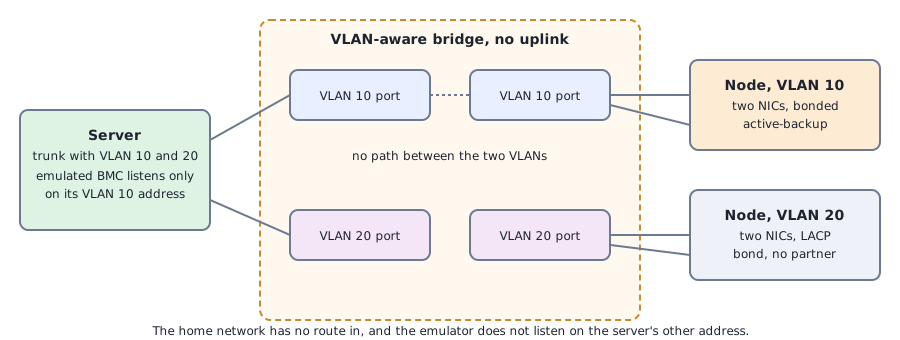
- A management network. The isolated bridge from the previous post, now with VLANs. The provisioning server carries VLAN 10 as the management segment and VLAN 20 as a data segment, and has an address on each.
- A BMC emulator on the management segment. The same Redfish mockup server as in the first Part 6 post, bound to the server’s VLAN 10 address only.
- Isolation checks. One node in each VLAN, and checks from each node and from the home network of who can reach the emulator.
- Two bonds. An active-backup bond on one node whose link I pulled, and an LACP bond on the other.
How it works
For RAID the script uses mdadm, the Linux software RAID tool. It builds the arrays, which start with an initial sync, puts a file system on each and writes a 1 GiB file of random data with its checksum. It then marks one disk as failed and removes it, which is what a dead disk looks like to the array. It reads the file back to see whether the checksum holds, writes more data to see how the degraded array behaves, adds a replacement disk, waits for the rebuild and checks the checksum again. The disks are found by their stable identifiers, because the usual device names can change from one boot to the next.
For the network, the bridge understands VLANs. Each node’s virtual port carries one VLAN, tagged by the bridge, so the node sees ordinary untagged traffic. The server’s port carries both, and the server has a sub-interface for each. The emulator is bound to the server’s address in VLAN 10 and listens nowhere else. A node in VLAN 20 has no way to reach it, even if it gives itself an address in the right range, because the bridge does not forward between VLANs and the server does not route between them.
For bonding, two network cards on a node are enslaved to one bond. In active-backup mode one carries traffic and the other waits, and the bond watches each link’s state. I pulled a link by setting it down on the hypervisor and counted the pings that were lost while the bond switched.
Commands and results
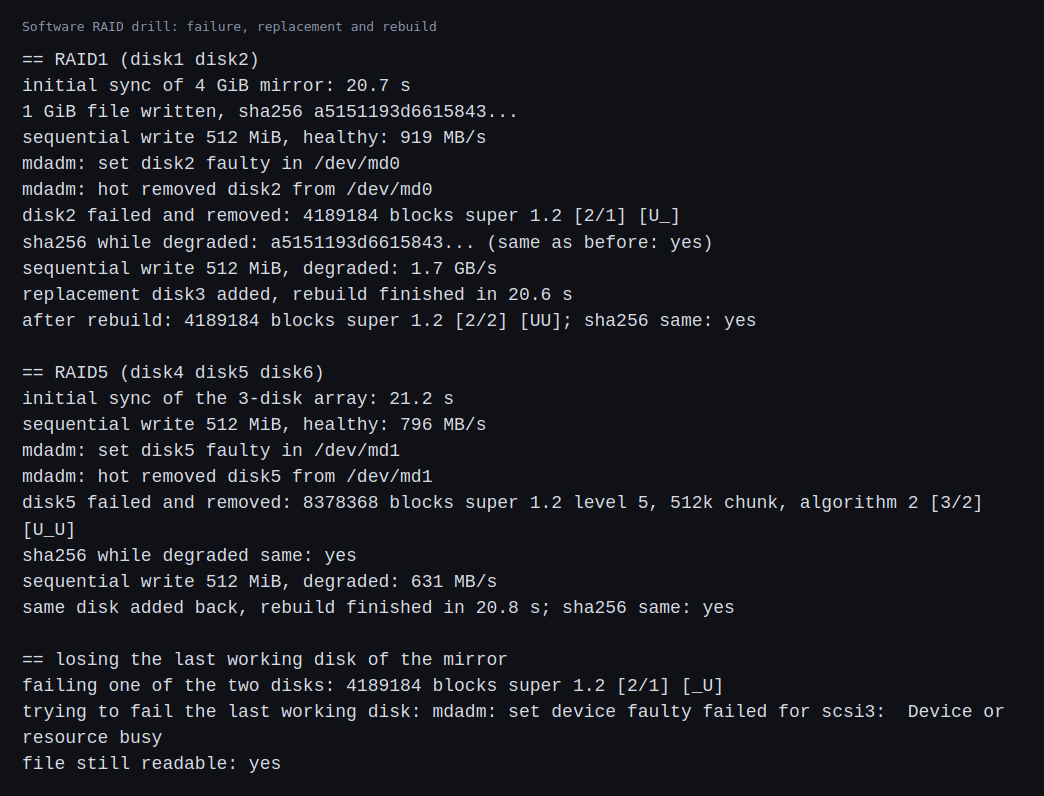
The mirror took 20.7 seconds to do its first sync of 4 GiB, and the three-disk array 21.2 seconds. After a disk of the mirror was failed and removed, the array was degraded and the file’s checksum was unchanged. A replacement disk rebuilt in 20.6 seconds, and the array was back to two good disks with the same checksum. The parity array behaved the same way: the checksum held with one disk missing, and the same disk added back rebuilt in 20.8 seconds.
Writes behaved differently in the two. A degraded mirror wrote faster than a healthy one, 1.7 GB/s against 919 MB/s, because it only had to write one copy. The degraded parity array wrote slower, 631 MB/s against 796 MB/s, because it had to work around the missing disk. The numbers come from virtual disks behind the host’s cache, so they only mean something relative to each other.
When I tried to fail the last working disk of the mirror, the array refused, with a message that the device was busy, and the file stayed readable. That protects an array from being emptied by a command. It does not help if the last disk dies for real.
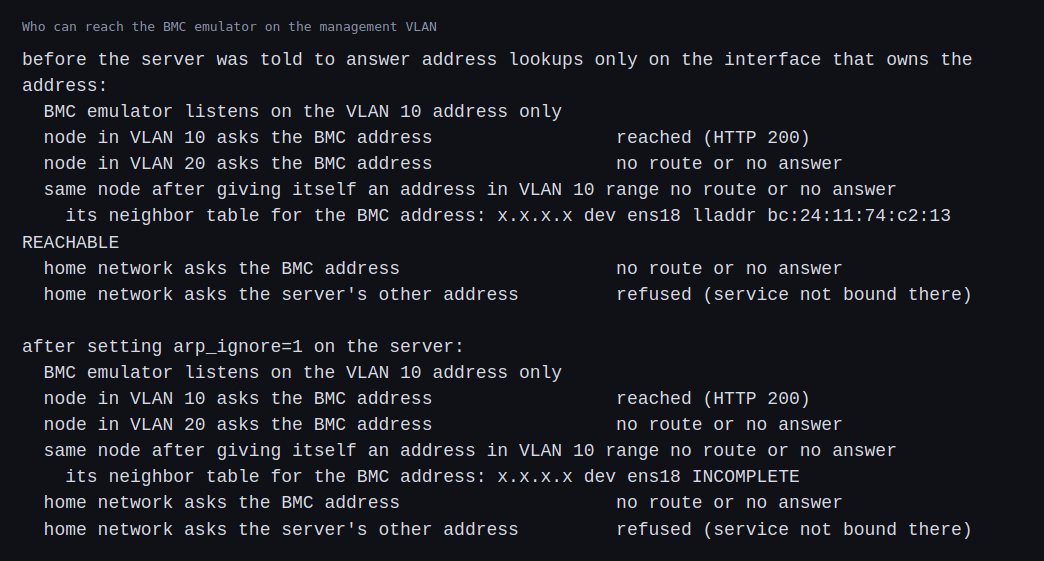
For the management network, a node in VLAN 10 reached the emulator, and a node in VLAN 20 did not. The home network had no route to the emulator’s address, and the server’s other address refused the connection because the emulator is not bound there. One result needed a fix. When the node in VLAN 20 gave itself an address in the management range and asked for the emulator, the request still failed, but the node’s address table had a complete entry for the emulator’s address with the server’s hardware address in it. The server had answered the address lookup on the wrong VLAN, which is the Linux default for a machine with several interfaces. After I set the server to answer only on the interface that owns the address, the entry stayed incomplete.
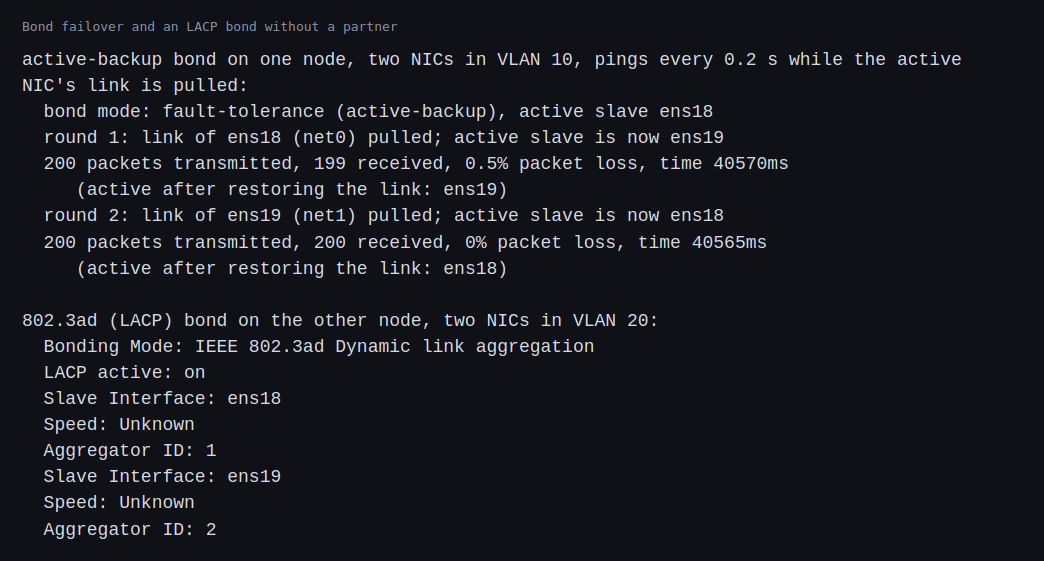
The active-backup bond failed over both ways. Pulling the link of the active card moved traffic to the other card, and a ping every 0.2 seconds lost one packet out of 200 in the first test and none in the second. Restoring the link did not move it back by itself. That is a result at 0.2 second resolution, so the real gap is somewhere under that or a little over.
The LACP bond on the other node did not form an aggregate. Each card ended up in its own aggregator, the virtual cards report their speed and duplex as unknown, and there was no switch to negotiate with. Traffic still passed. The kernel bonding documentation says 802.3ad mode creates aggregation groups that share the same speed and duplex, and lists two prerequisites: driver support for reporting each slave’s speed and duplex, and a switch that supports 802.3ad. Both were missing here, and a Linux bridge does not take part in LACP.
Challenges
- A degraded array looks healthy to its users. The mirror carried on at full speed, even faster, with a failed disk. Nothing but the array’s status says that one more failure will lose the data. The monitoring has to watch the array and not just the file system.
- Rebuild time grows with the disk. 4 GiB rebuilt in about 20 seconds, around 200 MB/s. At that speed a 4 TB disk would take about five and a half hours, and the array has no protection that whole time. That is an arithmetic estimate and not a measurement, and real rebuilds usually run slower under load.
- The address lookup leaked across VLANs. The traffic itself did not get through, but the server answered for an address on an interface that does not own it, which a separate management network should not do. It was the default behavior, and I would not have found it without looking at the address table.
- LACP needs a partner, and I did not have one. Link aggregation with a switch is how real servers use two links together, and a Linux bridge cannot stand in for the switch. The test I could run was active-backup, which shows failover and not aggregation.
- A single path in is a single point of failure. All the management traffic went through the server. If it is down, the management network and the BMC emulator are unreachable even though they are fine.
Differences with a production setup
- Disks. Real arrays run on hardware RAID controllers or on software RAID such as mdadm with monitoring and hot spares, and large fleets often replace RAID with replication of the data across machines. I also did not test ZFS, a mirror with checksums built into the file system.
- Failures. Real disks fail slowly, with read errors and reallocated sectors, and real rebuilds compete with production traffic. I removed a healthy virtual disk.
- Networks. Production management networks are usually physical, with their own switches, firewalls and access lists, and BMCs are reachable only through a jump host or a VPN.
- Switches. A real switch speaks LACP, defined in IEEE 802.1AX, and servers can be spread over two switches. The Linux bonding documentation describes the modes and the failure detection I used.
- Address behavior. The setting I changed, arp_ignore, is described in the kernel’s IP sysctl documentation. Real fleets set it with the rest of the network configuration.
FAQ
What is the difference between RAID 1 and RAID 5?
RAID 1 keeps a full copy of every block on a second disk. RAID 5 spreads data and parity over three or more disks, so it uses less space for the protection and has to compute the missing data when a disk is gone.
Is RAID a backup?
No. It protects against a disk failing. It does not protect against deleting a file, a bug, ransomware or a lost server, all of which RAID replicates faithfully.
Why does the rebuild matter more than the failure?
Until it finishes, the array has no protection, and the rebuild reads every block of the surviving disks, which is when a second weak disk is most likely to fail.
Why have a separate management network?
BMCs are powerful and often run old firmware. Keeping them on a network that production machines and the internet cannot reach limits what an attacker or a mistake can do.
What is the difference between a VLAN and a separate switch?
A VLAN separates traffic on shared hardware by tagging it, and a separate switch separates it physically. A VLAN is cheaper and a misconfiguration can leak, as the address lookup showed. A physical separation is simpler to reason about.
Why use a bond?
So that a failed cable, port or card does not take the machine off the network. Active-backup needs nothing from the switch. LACP can also use both links at once, with the switch’s cooperation.
What will change the most between these VM disks and real hardware?
Disk behavior. Real disks fail in more ways than a removed virtual disk and rebuild at their own speed under load, and a real LACP partner and physical switches behave differently from the virtual bridge.
Repeating with real hardware
Coming soon. When I have real servers, I will repeat the RAID drill on physical disks and pull a real one, time a rebuild on a large disk, try ZFS, and build the management network on a physical switch with LACP.
Next
Take the quiz to test your understanding: Part 6 quiz
Part 6 ends here. Part 7 moves to cloud and GPU exercises, starting with emulation.
Comments