Goal
Two questions come up before a machine goes into service. How closely does its configuration follow a published security baseline, and can it show that it booted the software it was supposed to?
The first is hardening. A baseline such as the CIS Benchmarks is a long list of settings, and a scanner checks a machine against it and gives a score. The second is boot security. Secure Boot makes the firmware refuse software that is not signed by a trusted key, and a TPM, a small security chip, records measurements of what booted so that a secret can be released only to a machine in the expected state.
This post does both on virtual machines. It is the first pass with emulation, so the TPM is a software one provided by the hypervisor and the keys are the generic ones it ships with. It shows the method and what the tools report, and it says where a real machine would differ.
Terms used in this post
- Hardening: changing a machine’s configuration to remove ways it can be attacked or misused.
- Baseline: a published list of settings to aim for. The CIS Benchmarks are the best known.
- Profile: a named selection of rules from the machine-readable form of a baseline, such as CIS Level 1 for servers.
- OpenSCAP: a scanner that evaluates a machine against such a profile and can apply the profile’s fixes.
- Lynis: an auditing tool that runs many checks and reports a hardening index from 0 to 100 and a list of suggestions.
- Remediation: applying fixes for the rules that failed.
- Secure Boot: a UEFI feature that only starts boot software signed by a key the firmware trusts.
- Shim: a small signed program that bridges the firmware’s trusted keys to the boot loader of a Linux distribution.
- Kernel lockdown: a mode where the kernel refuses actions that could change itself, such as loading an unsigned module. Secure Boot switches it on.
- TPM: a trusted platform module, a chip or software device that stores keys and measurements.
- PCR: a platform configuration register in a TPM. It can only be extended with new measurements, never set directly.
- Measured boot: recording each boot stage into the PCRs. PCR 7 holds the Secure Boot state.
- Sealing: encrypting a secret in the TPM so it is released only when chosen PCRs have chosen values.
What I built
- A hardening target VM. A Debian 12 machine that I scanned with Lynis and with OpenSCAP against the CIS Level 1 profile for servers, hardened with the profile’s own fixes, rebooted and scanned again. I took a snapshot first so I could go back.
- A boot-security VM. A second Debian 12 machine with UEFI firmware, Secure Boot keys enrolled and a virtual TPM 2.0.
- A check script for the boot-security VM. It reports the Secure Boot and lockdown state and some TPM registers, tries to load an unsigned kernel module, and tries to unseal a secret that is bound to PCR 7.
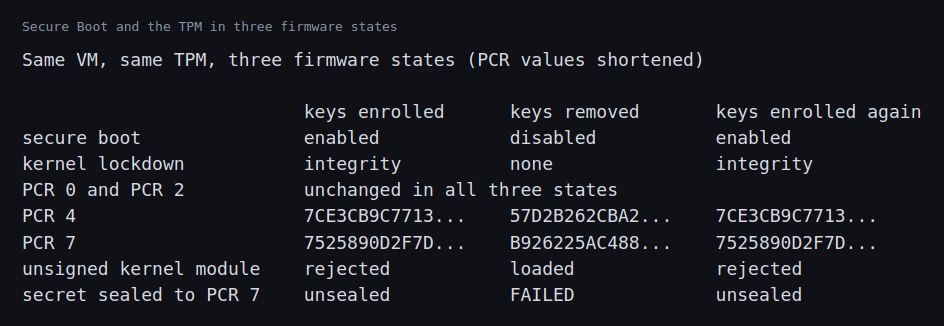
- Three firmware states. Keys enrolled, keys removed so Secure Boot is off, and keys enrolled again, with the same disk and the same TPM throughout.
How it works
Lynis runs a few hundred checks of its own and reports a hardening index and warnings and suggestions. OpenSCAP works from SCAP content, the machine-readable form of a baseline. The content from the Debian package I installed was too old to include Debian 12, so I used a newer release of the ComplianceAsCode content, which has a CIS Level 1 server profile for Debian 12. A scan gives each rule a result such as pass, fail or not applicable, and a score. The remediation mode of the same tool runs the fix script of each failing rule.
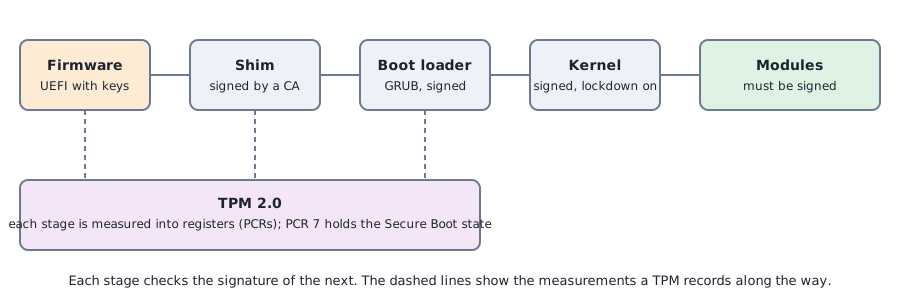
For boot security, the firmware holds a database of trusted keys. The distribution’s shim is signed by a key in that database, shim checks the boot loader, the boot loader checks the kernel, and the kernel in lockdown mode accepts only signed modules. Along the way each stage is measured into the TPM. PCR 7 changes when the Secure Boot configuration changes. A secret sealed to a policy on PCR 7 can be unsealed only while PCR 7 has that value.
The hypervisor creates the firmware variable store with the generic Microsoft keys already enrolled, which is enough for Debian’s signed boot chain. Removing that store and creating one without keys gives a machine with Secure Boot off. The machine boots first with the default firmware so that its first-boot setup runs, and is then switched to UEFI. The Debian cloud image has both boot paths on the same disk.
Commands and results
The scores before and after hardening, with a reboot in between, are below. OpenSCAP’s CIS score rose from 67.9 to 92.3, with passing rules going from 223 to 318 and failing rules from 108 to 29. The Lynis hardening index rose from 64 to 73. The remediation reported 88 rules fixed, 12 errors and 8 still failing, and the rescan after the reboot is the number that counts.
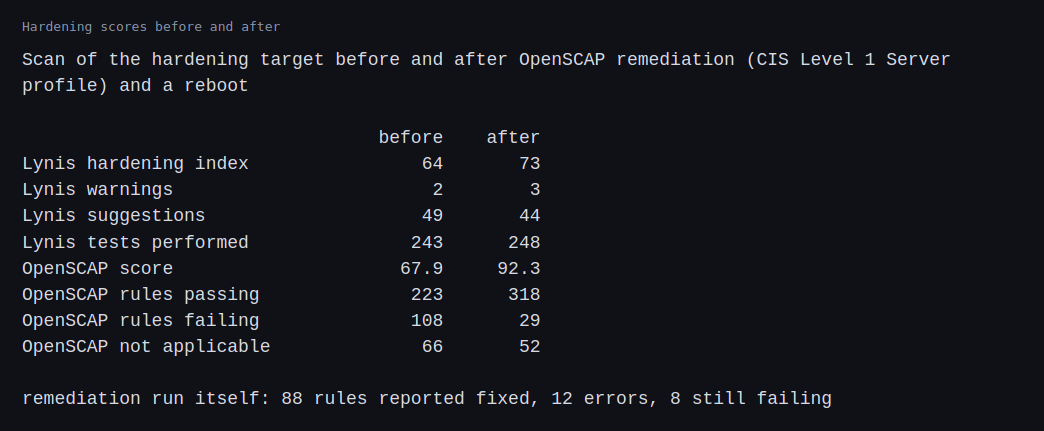
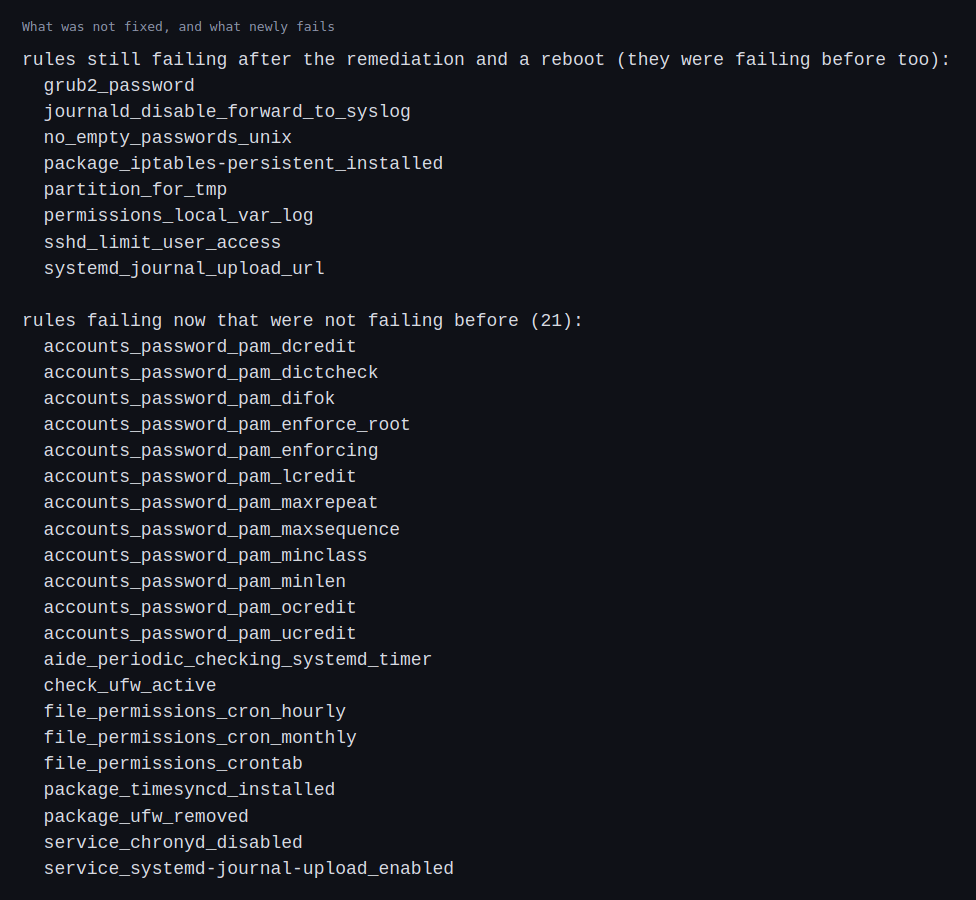
Not everything improved. Lynis warnings went from 2 to 3, because the new one says no AIDE database was found, which means the file integrity tool was installed but never initialized. Of the 107 rules that failed at first, 8 still fail. They need a decision or a change that the automatic fix cannot make: a boot loader password, a separate partition for temporary files, a list of users allowed to log in over SSH, and a few log and journal settings. In addition, 21 rules fail now that did not fail before. In 16 of them the result had been “not applicable” and became applicable once the remediation installed packages such as the password quality library. Five had passed: three about permissions of cron files, one about a firewall package and one about a time service package. Some rules in the profile cannot all pass at once, for example one that wants the firewall package removed next to one that wants it active, and one that wants a particular time service installed next to one that wants another disabled. I did not trace which fix caused each change.
On the boot-security VM, the first check with Secure Boot enabled reported that Secure Boot was on, the kernel lockdown mode was integrity, and a TPM 2.0 device was present. A module I built myself, which was unsigned, was refused with the message that its key was rejected. A secret sealed to PCR 7 was released.
With the keys removed and the machine rebooted, Secure Boot reported disabled and lockdown was off. The same unsigned module loaded without complaint. PCR 4 and PCR 7 had changed, while PCR 0 and PCR 2 had not, and the secret could no longer be unsealed because the policy on PCR 7 no longer held.
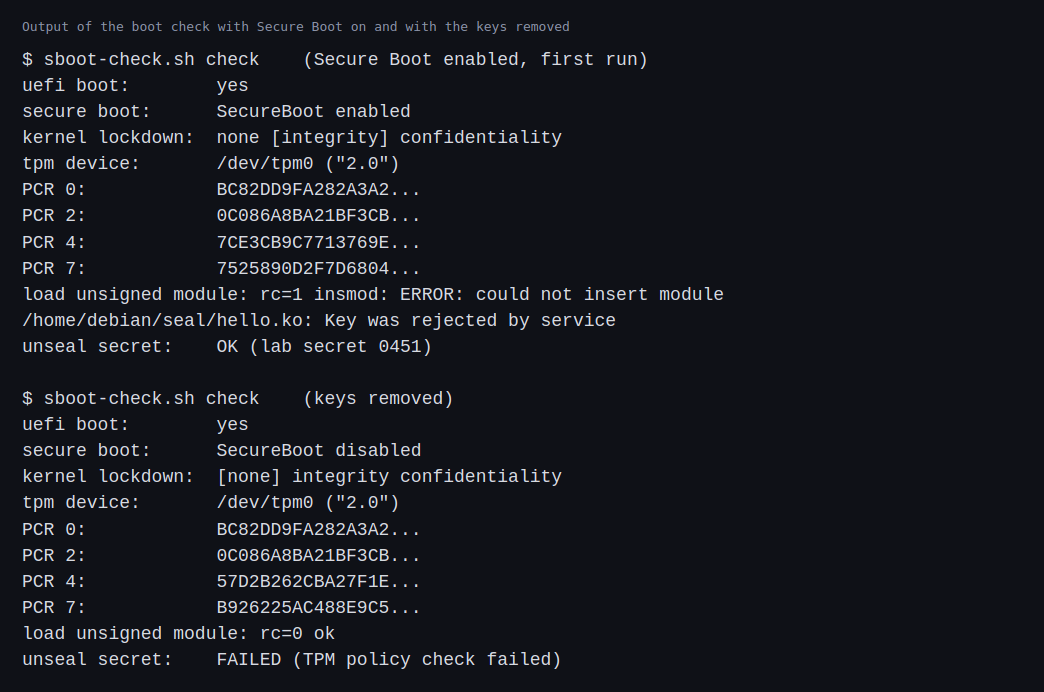
After enrolling the keys again and another reboot, PCR 4 and PCR 7 had their original values, the module was refused again and the secret was released again. The table shows the three states side by side.
Challenges
- A higher score is not the goal. The score went up by about 24 points, and the same remediation introduced 21 rules that fail and a new Lynis warning. The numbers say how close a machine is to the profile, and a person has to decide which of the remaining differences matter.
- Rules in a profile can conflict. After the fixes, the rule that wants the firewall package removed and the rule that wants it active were both failing, and so were the rules about which time service is installed and which is disabled. Some sets of rules cannot all pass, whatever the order of the fixes.
- Automatic fixes change how the machine behaves. After the hardening and a reboot, files I had copied into the temporary directory were gone. Anything that relied on that directory would have broken. A hardening change needs a test of what the machine is used for, not only a scan.
- Some fixes need a human. A boot loader password needs a secret that someone must keep. A separate partition for temporary files has to be planned at install time. A list of allowed SSH users is site policy. The scanner can only report these.
- Sealing ties a secret to the firmware state. A secret sealed to PCR 7 became unreadable when Secure Boot was turned off and readable again when the same keys came back. On a real fleet this is how disk encryption keys behave, and a firmware change without a plan for recovery can lock a machine out of its own data.
- Generic keys are not a trust decision. The keys here came from the hypervisor’s default store. A real deployment chooses which keys to trust and how to rotate them.
Differences with a production setup
- Baselines. Production teams use the CIS Benchmarks, often through the vendor’s own tools, and keep a record of the settings they chose not to follow and why. The ComplianceAsCode content and OpenSCAP are the open source route that I used. Lynis is a separate auditing tool.
- Applying fixes. Hardening is usually done by configuration management at build time, not by a scanner’s fix mode on a running machine. Projects such as Ansible Lockdown publish roles for the CIS benchmarks.
- Keys. Production Secure Boot uses keys the organization controls, enrolled in the firmware and rotated on a schedule, and signs its own kernels and modules.
- TPMs. A real server has a hardware TPM with its own manufacturer certificate. Mine was a software one that lives with the VM. The TPM 2.0 specification is the reference.
- Attestation. Fleets check a machine’s measurements from a remote service before trusting it. Keylime is an open source example. I only read the registers on the machine itself.
- Disk encryption. A common use of sealing is unlocking an encrypted disk. The systemd tool systemd-cryptenroll can bind a disk key to PCR values. I sealed a short test secret.
- Out-of-band security. A BMC has its own firmware and its own signing and update path. I did not cover it here.
FAQ
What does Secure Boot protect against?
Software that runs before the operating system and is not signed, such as a modified boot loader or kernel. The firmware refuses it, and the kernel then refuses unsigned modules.
What is a PCR, and why PCR 7?
A PCR is a register that can only be extended, so its value is a summary of everything measured into it. PCR 7 records the Secure Boot configuration, so it changes when the keys or the on and off state change.
Why seal a secret to the boot state?
So that the secret is released only on a machine that started in the expected way. If someone changes the firmware settings or boots something else, the TPM refuses.
Is a higher hardening score always better?
No. It tells you how many of a profile’s rules pass. Some rules do not fit a machine’s job, some conflict, and a fix can break something that was working. The failing rules matter more than the number.
Why take a snapshot before hardening?
Automatic fixes can lock you out or change behavior you rely on. A snapshot makes it cheap to go back. The machine here did stay reachable over SSH afterwards.
What will change the most between these VMs and real servers?
The hardware root of trust. The TPM here was software and the keys were generic, so attestation, custom keys and disk encryption tied to a real TPM are where the setup will change most.
Repeating with real hardware
Coming soon. When I have a real server, I will enroll my own Secure Boot keys, use the hardware TPM and seal a disk key to its measurements, run the hardening scan from install time with a planned partition layout, and try remote attestation.
Next
Take the quiz to test your understanding: Part 6 quiz
Part 6 continues with provisioning blank machines: network boot, software RAID and a separate management network.
Comments