Goal
GPU infrastructure is talked about in product names, and the names stack on top of each other. Someone who racks, powers and operates these machines needs to know which name means a board, which means a server, and which means a whole cluster design, because each one changes what the buyer is responsible for.
I do not have any of these systems, so this post is reading. Everything comes from NVIDIA’s pages and guides, linked where used. Prices and availability change quickly, and the pages describe current and recent generations, so treat the specific models as examples of the structure.
Terms used in this post
- Baseboard: the board that carries the GPUs and their NVLink connections, which a server maker builds into a chassis.
- OEM and ODM: companies that sell servers under their own brand, and companies that design and build servers for others to sell.
- Reference architecture: a documented design, with parts, wiring and layout, that others can follow.
- Scalable unit: a repeatable block of servers and switches in a reference architecture. In the DGX H100 SuperPOD it is 32 servers.
- Rack-scale system: a design where the rack is the product, with many GPUs in one NVLink domain.
- BMC: the management controller in a server, reached over the out-of-band network.
- In-band and out-of-band management: management traffic that uses the server’s normal network, and traffic that uses a separate network to the BMC.
What I built
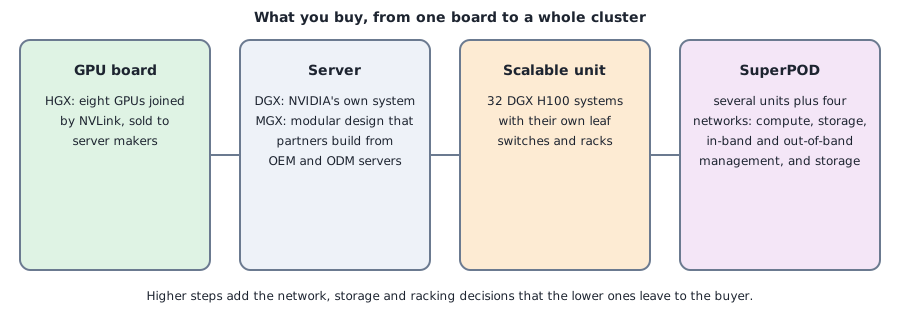
- A ladder diagram. It places the GPU board, the server, the scalable unit and the full cluster design next to each other, with what each adds.
- A comparison table. Each name, what it is, who builds the surrounding parts, and what the buyer still decides.
- Cross-references. Where the design lines up with earlier parts: the BMC fleet and PXE posts from Part 6, and the power plan.
How it works
HGX is the GPU board level. NVIDIA’s HGX page describes the current eight-GPU Rubin board as eight GPUs with sixth-generation NVLink, which can be paired with NVIDIA’s own CPUs or with x86 CPU baseboards. Server makers build it into their own chassis, so two servers with the same HGX board can differ in CPUs, memory, network cards, drive bays, power supplies and cooling.
DGX is NVIDIA’s own finished system. The DGX H100 user guide describes eight H100 GPUs with NVSwitch giving 900 GB/s GPU-to-GPU bandwidth, two Intel Xeon 8480C CPUs with 56 cores each, eight 3.84 TB NVMe drives as a data cache and two 1.92 TB drives for the operating system, eight ConnectX-7 cards for the cluster network, and six power supplies in a 4+2 redundant arrangement. NVIDIA’s DGX SuperPOD page lists newer systems in the family, with the liquid-cooled rack-scale ones next to eight-GPU systems.
MGX is a modular design for partners. NVIDIA’s MGX page calls it an open modular reference architecture that lets OEMs and ODMs build accelerated systems faster, with different mixes of GPUs, CPUs and networking, including Grace, x86 and other Arm CPUs, from single servers to rack-scale systems.
SuperPOD is the cluster level. The reference architecture for DGX H100 builds on scalable units of 32 DGX H100 systems and covers the InfiniBand and NVLink networks, the Ethernet fabric, storage, rack layout, and power and cooling. The fabric chapter names four networks: compute, storage, in-band management and out-of-band management.
Rack-scale systems are the newest step. The GB200 NVL72 page describes 36 Grace CPUs and 72 Blackwell GPUs in one rack-scale, liquid-cooled design with a 72-GPU NVLink domain. The DGX GB200 page describes a liquid-cooled rack of the same size, and says multiple racks connect with Quantum InfiniBand. Part 8’s last post covers what that does to power and cooling.
What a node is. In this world “node” means the unit that runs one operating system image and that a scheduler places jobs on. In a DGX H100 that is the whole 8-GPU server. In a rack-scale system it is smaller than the rack. The DGX GB Rack Scale Systems User Guide lists an NVL72 rack as:
| Part | Count per rack | What it is | Is it a node? |
|---|---|---|---|
| Compute tray | 18 | 1 RU, 2 Grace CPUs and 4 Blackwell GPUs, its own OS and BMC | Yes: one compute node with 4 GPUs |
| NVLink switch tray | 9 | 1 RU, 2 NVSwitch chips of 72 ports, runs NVOS | No job runs here, but it is a managed device with its own OS and BMC |
| Top-of-rack switch | 2 | Ethernet for the BMCs and switch trays | A network device |
| Power shelf | several (eight in the guide’s GB200 figures) | AC in, 50 to 51 V DC out to a bus bar | A managed device on the out-of-band network |
So a rack is 18 compute nodes, not one machine and not 72 machines, and the NVLink domain spans all 18. A SuperPOD of eight such racks has 144 compute nodes and 576 GPUs, and a job that needs more than one rack leaves the NVLink domain and uses InfiniBand. A cluster of this kind also has nodes that carry no GPUs at all: the guide mentions a head node that runs the cluster manager and control plane nodes, and production sites add login nodes, storage nodes and CPU utility nodes. When someone says a site has “36 GPU compute nodes”, it is this count of trays, not racks or GPUs. The NVLink post goes through the rack’s fabric, the switch-tray software and the order in which a rack is brought up.
Commands and results
Here is the comparison, a table of documented facts.
| Name | What it is | Who builds the rest | What the buyer still decides |
|---|---|---|---|
| HGX | A board of eight GPUs joined by NVLink | Server makers, with their own CPUs, drives, power and cooling | Which vendor’s server, and everything outside the board |
| DGX | A complete server, or a rack-scale system, from NVIDIA | NVIDIA | The network, storage, racks, power and cooling around it |
| MGX | A modular design that partners follow | OEMs and ODMs | Which partner’s build, and the parts mix |
| SuperPOD | A cluster design made of scalable units | NVIDIA’s reference, built by the buyer or an integrator | Site details: rooms, power feeds, scale and schedule |
In the SuperPOD design, the DGX H100 power numbers also feed rack planning. The user guide gives a maximum of 10.2 kW per system. Part 8’s last post works that into rack arithmetic.
For operations the structure has consequences. Each level brings its own firmware and software to update: GPU drivers and the NVLink fabric manager on the server, BMC firmware for out-of-band management, switch firmware and a fabric manager on the network. Part 6 covered the BMC and provisioning side on emulated machines, and the lifecycle questions are the same on real ones: inventory, drift detection, a known-good image and a burn-in before a node joins the pool.
Challenges
- A product name does not tell you the boundary of the warranty. With a server-maker build on an HGX board, the maker owns the chassis, the power supplies and often the firmware bundle, and NVIDIA owns the board. A fault in between needs triage before a support case.
- The reference design assumes a whole-site fit. A scalable unit has fixed rack counts, cable lengths and power per rack. Space, floor loading, feeds or cooling at a site rarely match, which is where the schedule slips.
- Partial builds need the full fabric. The reference architecture says that when fewer servers are deployed, the fabric should still be built for the full unit, with the unused part left empty, so performance stays consistent. That means paying for switches and cables ahead of the servers.
- Firmware versions across levels must match. Drivers, fabric manager, BMC, switch and network card firmware all have supported combinations. A node reinstalled with a different driver than its neighbors can fail collectives that its neighbors pass.
- None of this can be practiced here. I have no HGX, DGX or MGX hardware. In the future I’m planning to purchase a hardware kit to help practice further.
Differences with a production setup
- Generations. The DGX H100 guide describes an older generation, and newer systems change the GPU count per domain, cooling, power and network speeds. The structure of board, server, unit and cluster stays the same, and the numbers do not.
- Buying paths. Many sites buy from server makers using HGX or MGX designs and not DGX, and cloud providers rent the same shapes by the hour.
- Operations. Production sites run vendor management software, an inventory system and an image pipeline on top, as in the Part 6 posts.
- Documentation. The reference architectures are the document to read before design, because they list the cable counts, rack layouts and power figures the summary above leaves out.
FAQ
What is the difference between HGX and DGX?
HGX is a GPU board that server makers build into their own servers. DGX is NVIDIA’s complete system.
What is MGX for?
It is a modular design that OEMs and ODMs use to build different server shapes with the same building blocks.
What is a SuperPOD?
A cluster design built from scalable units, with four networks: compute, storage, in-band management and out-of-band management.
How many servers are in a scalable unit?
In the DGX H100 SuperPOD reference architecture, 32.
What will change the most between this summary and a real purchase?
The specific models and prices. The structure of HGX, DGX, MGX and SuperPOD stays, while the models, configurations and availability change with each generation.
Repeating with real hardware
Coming soon. With real systems I will compare the vendor’s inventory and topology output with the documentation, and check the firmware and driver versions across a rack before joining nodes to a pool.
Next
Take the quiz to test your understanding: Part 8 quiz
The last post in this part, power and liquid cooling, covers the rack side.
Comments