Goal
GPUs are the scarcest and most expensive thing in an AI cluster, so how they are handed out matters more than for CPUs. A scheduler has to place jobs that need whole GPUs, several GPUs on one machine, or a particular kind of GPU, and it has to decide who waits and who gets pushed out. Kubernetes has two ways to describe GPUs: as a plain count on a node, and, more recently, as described devices that a pod can ask for by their properties.
The lab has no GPUs, so we use emulated ones. The scheduler is the real Kubernetes scheduler and the behavior measured here is its behavior, but the GPUs are numbers and mock devices. This post covers three things on the cluster, a counted GPU resource, device allocation with an example driver, and a paper exercise on splitting one GPU into slices.
Terms used in this post
- Extended resource: a resource with a custom name that Kubernetes counts like CPU or memory, such as a GPU count.
- Device plugin: the usual way a node tells Kubernetes about GPUs and gives them to containers.
- Fragmentation: free capacity that exists in total but cannot be used because it is split across machines.
- Preemption: removing a lower-priority pod to make room for a higher-priority one.
- Priority class: a named priority that a pod can carry.
- Dynamic resource allocation (DRA): a Kubernetes way to request devices by their properties, using claims, instead of a plain count.
- Resource claim: a request for devices, which the scheduler allocates to a pod.
- CEL: the Common Expression Language, used here to select devices by their attributes.
- MIG: multi-instance GPU, a feature of some data center GPUs that splits one GPU into isolated slices.
- Time slicing: sharing one GPU between processes by taking turns.
What I built
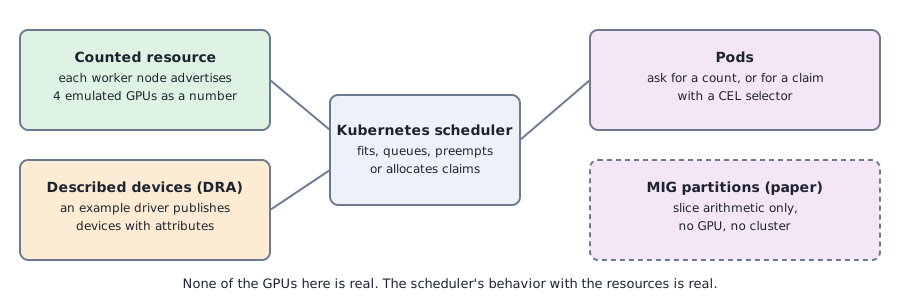
- A counted GPU resource. Each of two worker nodes advertises four emulated GPUs as a custom resource, set on the node’s status with an API call. No device plugin is involved.
- Two scheduling drills. One for fragmentation and one for priority and preemption, run with the real scheduler.
- The Kubernetes example DRA driver. It runs on every node and publishes four mock GPUs each as devices with attributes such as a model and memory. A claim selects devices with a CEL expression, and a pod uses the claim.
- A MIG paper exercise. A script that enumerates which combinations of the published slice sizes of one GPU model fit together, with the placement rules left out.
How it works
For the counted resource, a node’s status can carry any extended resource, and the scheduler treats it like CPU. Pods ask for it in their limits, and it is allocated in whole units. The scheduler knows only the count: it cannot tell which GPU, what model or how the GPUs are connected.
For DRA, a driver on each node publishes the node’s devices as resource slices, each device with attributes and capacity. A pod references a claim, and the claim says how many devices it needs and, if it wants, a selector that checks their attributes. The scheduler finds devices that match and allocates them to the claim, and the driver prepares the devices for the container. The example driver is built to show the mechanism. Its devices are mock devices, and it exposes them to the container as environment variables.
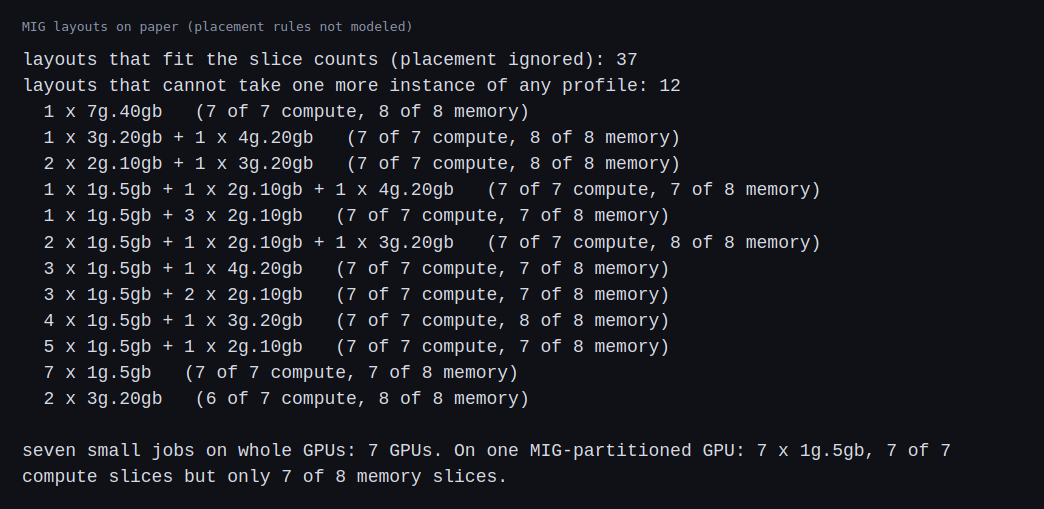
For MIG, a GPU of a supporting model can be split into instances of a few fixed sizes. The published sizes of a 40 GB card use some of seven compute slices and eight memory slices, and each size has a maximum count. The script tries every combination against those limits. Real layouts also have placement rules about which slices an instance may use, which I did not model, so the script prints a superset of what is valid.
Commands and results
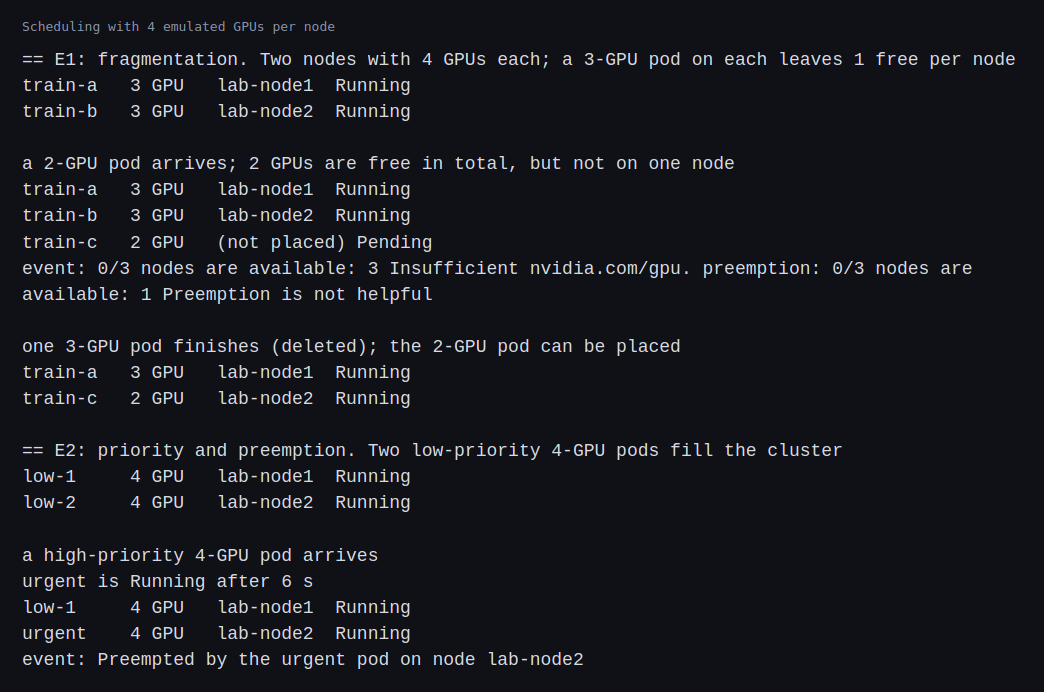
For fragmentation, I placed a 3-GPU pod on each of the two nodes, leaving one GPU free on each. A 2-GPU pod then arrived. Two GPUs were free in total and the pod stayed pending, with the scheduler reporting that no node had enough of the GPU resource. When one of the 3-GPU pods finished, the 2-GPU pod was placed on that node.
For priority and preemption, two low-priority pods asked for four GPUs each and filled the cluster. A high-priority pod asking for four GPUs arrived, one of the low-priority pods was preempted, and the high-priority pod was running 6 seconds after it was created.
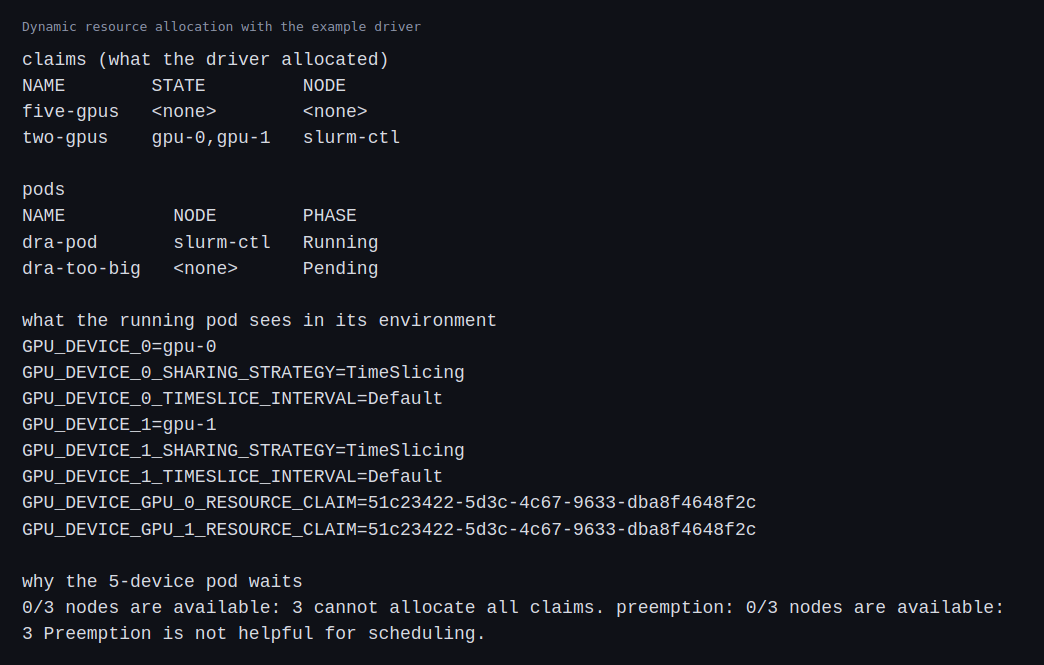
For DRA, the driver started on all three nodes, including the control-plane node, and published four devices on each. A claim for two devices whose model matched and whose memory was at least 40 GiB was allocated devices gpu-0 and gpu-1 on the control-plane node, and the pod using the claim started there. Inside it, the environment listed the two devices and a sharing strategy of time slicing, which the example driver sets and does not enforce. A claim for five devices could not be allocated, because no node had more than four, and its pod stayed pending with a message that no node could allocate all the claims.
For MIG, 37 combinations of the five profile sizes fit within seven compute slices and eight memory slices, and 12 of them could not take another instance. One of those is seven of the smallest profile on one GPU, which is seven small jobs sharing one card where the counted resource would give each a whole GPU. Another is two of the 3-slice instances, which leaves one compute slice unused.
Challenges
- Free capacity is not usable capacity. Two free GPUs on two nodes could not run a 2-GPU pod, and in a real cluster that is idle money. Scheduling policy, such as packing jobs onto fewer nodes or reserving whole nodes, is what keeps whole machines available.
- Preemption throws work away. The high-priority pod started in 6 seconds, and the preempted pod’s progress was lost. For training jobs that means checkpoints and a decision about which jobs may be evicted.
- A count cannot say which GPU. The scheduler placed pods by number, with no way to ask for a model, memory size or connection between GPUs. DRA lets a claim ask for properties, but it is newer and needs a driver.
- A driver runs wherever you let it. The example driver also published devices on the control-plane node, and the claim landed there. A real GPU driver would be limited to GPU nodes, with labels and taints to match.
- Mock devices have no isolation. The environment said time slicing, and nothing shared a GPU. Sharing and isolation are properties of real hardware and drivers.
- MIG layouts are constrained. Slice counts alone allow layouts the hardware may not, and a layout cannot always be changed while jobs are running. Splitting GPUs by hand is an operations task as well as a scheduling one.
Differences with a production setup
- Device plugin. A real cluster runs a GPU device plugin, usually installed by an operator, and labels nodes with the GPU model, for example with GPU feature discovery. I set the count by hand.
- DRA. The mechanism is described in the Kubernetes dynamic resource allocation documentation. Production uses a real driver, such as the DRA driver for NVIDIA GPUs, and not the example driver I used.
- Extended resources and priority. The setup I used is described in Kubernetes’ pages on advertising extended resources and priority and preemption.
- Batch scheduling. Training jobs usually need all their pods at once, which a queueing system such as Kueue or Volcano provides. Part 5 covers a queue for CPU, and I did not run one with GPUs here.
- MIG. The slice sizes and the placement rules are in NVIDIA’s MIG user guide, and a real cluster changes layouts with a manager that drains the node first.
- Topology. Real GPU jobs care how GPUs are connected inside a machine and between machines. Nothing here models that.
FAQ
What does the scheduler know about a GPU?
With a counted resource, only the number. It does not know the model, the memory or how the GPUs are connected. DRA adds attributes the scheduler can match.
Why did the 2-GPU pod wait with 2 GPUs free?
Both free GPUs were on different nodes, and a pod must fit on one node. That is fragmentation.
What does preemption cost?
The preempted pod stops and its progress is lost unless it checkpointed. It is a trade of one job’s work for another’s urgency.
What does DRA add over the device plugin?
Devices with attributes that a claim can select, shared between pods in defined ways, and allocation decisions made by the scheduler, instead of a plain count handled by the node.
Why was MIG only a paper exercise?
It needs a GPU that supports it, and a consumer card does not. I can show the slice arithmetic and stop there.
What will change the most between the emulation above and the real GPUs?
Devices and topology. Real GPUs come from a driver with real attributes, links between cards and queues and quotas around them, so placement will depend on topology that the counted resource here does not describe.
Repeating with real hardware
Coming soon. When I have GPUs, I will install the real device plugin and DRA driver, run the same fragmentation and preemption drills, try a MIG layout on a supported card, and test a queue with GPU quotas.
Next
Take the quiz to test your understanding: Part 7 quiz
The last post in this part, NUMA topology, looks at how memory layout affects placement on a virtual two-node machine. A run on real GPUs would come after it and needs a spend cap agreed beforehand.
Comments