Goal
The cluster in the rest of this track runs k3s, which installs the whole control plane from one binary. Most clusters on bare metal are built with kubeadm or with tools that use it, and the steps are the ones an operator has to understand: prepare a machine, start a control plane, join nodes, upgrade, and replace a node that is gone. This post builds a three-node cluster with kubeadm on new VMs, upgrades it by one minor version with probes running, replaces a worker, and looks at what breaks along the way. It is the lifecycle half of the story that the PXE and BMC posts started: those get an operating system onto a server, and this starts from a server that has one.
Terms used in this post
- kubeadm: the tool that sets up a Kubernetes control plane and joins nodes to it, and that upgrades them later.
- Static pod: a pod that the kubelet runs straight from a file in a directory on its own node, without asking the API server. kubeadm runs the control plane this way.
- Control plane node: a node that runs the API server, etcd, the scheduler and the controller manager.
- Bootstrap token: a short-lived secret that lets a new node prove that it may join.
- Join: the step where a node contacts the control plane with a token, gets its certificates and starts its kubelet.
- Drain: move the pods off a node and mark it unschedulable, before work on it.
- Version skew: the allowed difference between component versions. A kubelet may be older than the API server and never newer.
- Cluster API: a project that manages clusters and their machines through Kubernetes objects, using kubeadm underneath in its default setup.
- Metal3 and Ironic: Metal3 connects Cluster API to Ironic, the service that powers on and installs bare metal servers.
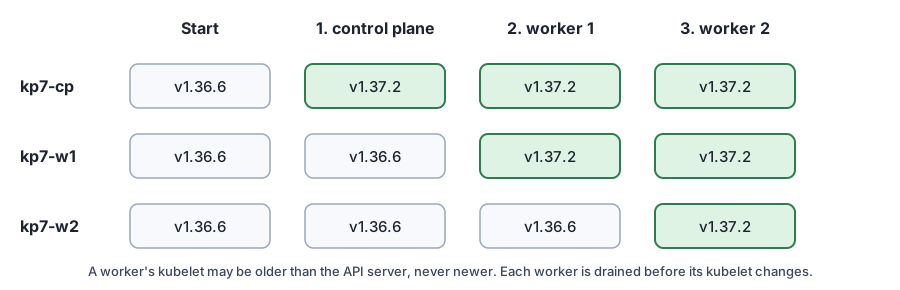 Diagram: the control plane goes first, then each worker, with the version of each node at each step.
What I built
Three new VMs on the Proxmox host, cloned from the same Debian 12 image as the earlier ones: kp7-cp as the control plane with 2 vCPUs and 2 GB, and two workers with 1 GB. They are small, and kubeadm sets a floor for the control plane. kubeadm needs at least two CPUs and about 1.7 GB on a control plane node, and the workers have no such check.
Two Ansible files do the work, so that it can be repeated. A role prepares a node. It adds the container runtime and the Kubernetes package repository for one minor version, installs containerd, kubelet, kubeadm and kubectl at fixed versions and holds them, loads the kernel modules and sets the sysctl values that pod networking needs, and switches containerd to the systemd cgroup driver. A playbook then runs kubeadm init on the control plane, installs flannel, and joins the workers with a fresh token.
The cluster starts at Kubernetes 1.36.6 and ends at 1.37.2.
How it works
kubeadm init makes the cluster’s certificate authorities and the certificates under /etc/kubernetes/pki, writes kubeconfig files for each component, and writes four manifests into /etc/kubernetes/manifests: etcd, the API server, the controller manager and the scheduler. The kubelet watches that directory and starts a pod for each file. Moving a file out stops the pod, and moving it back starts it again.
A new node joins with kubeadm join, a control plane address and a token. The token lets it read a signed public ConfigMap with the cluster’s CA, check the signature, and then request a certificate for its kubelet.
An upgrade has two layers. kubeadm upgrade apply rewrites the control plane manifests at the new version, and the kubelet restarts those pods. The kubelet and kubectl are separate packages and are upgraded on each node by hand, after the node is drained. The control plane goes first, because a kubelet may be older than the API server but not newer.
Commands and results
Build. The playbook prepared the three nodes and ran kubeadm init. All three nodes were Ready about two minutes after the control plane started. kubeadm certs check-expiration listed the certificates at 364 days and the authorities at nine years.
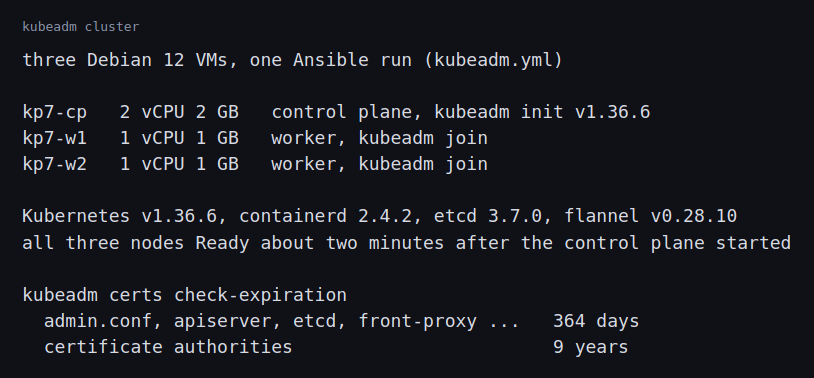 Image: the VMs, the versions and the certificate lifetimes.
A single control plane stops. I moved kube-apiserver.yaml out of the manifests directory for 60 seconds. The API server was refused from one second after the move, and kubectl on the control plane node said “connection refused”. The web Service I had deployed, probed through a worker’s NodePort every second, answered 200 every time. Five seconds after I put the file back, the API answered again. This is the same cluster-without-a-control-plane result as in the HA post, with a single control plane, where nothing was left to answer.
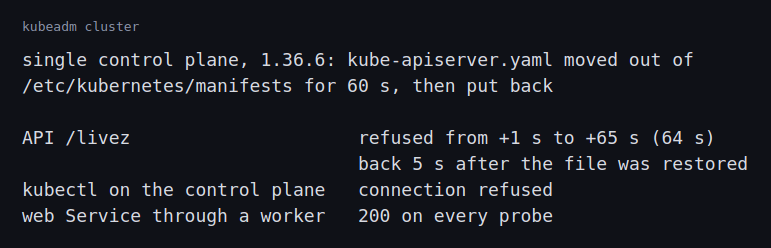 Image: the API and the web Service while the API server’s manifest was away.
Upgrade to 1.37.2. A playbook upgraded the control plane, then each worker in turn. While it ran, I probed the API’s /livez and the Service through both workers once a second.
- The API did not answer 70 of the 173 probes. There were short gaps from 33 to 92 seconds after the start, one gap of 40 seconds at about 110 seconds, and a few single failures late in the run. The kubeadm upgrade guide says the API server’s static pod keeps running during the upgrade, so in-flight requests stall while the new etcd static pod restarts, and it suggests stopping the API server a few seconds before the upgrade to finish those requests. With one control plane, each static pod restart is a gap in the API.
- The web Service answered every probe during the control plane step.
kubeadm upgraderenewed the control plane’s certificates. The admin certificate expiry moved from 17:28 to 17:33, a year ahead.- The first drain of a worker was refused with
Forbiddenby the freshly upgraded API server, and it worked when repeated. I reproduced this afterwards: I restarted the API server and asked for a node with the admin credential every 0.2 seconds. About 13 seconds after the restart began, one answer wasForbidden, for about 0.3 seconds, and every request after that succeeded. The API server was answering before it was ready to authorize requests, and my playbook had drained in such a window. - The two workers took 43 seconds together. The API did not fail a probe during that part, and the Service through a node missed one or two probes while that node was drained.
All three nodes ended on 1.37.2.
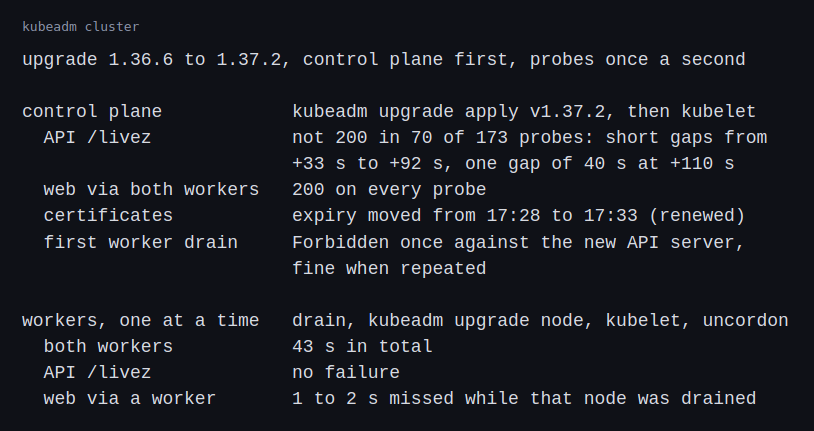 Image: the API and the Service during the control plane and the worker upgrades.
Replacing a worker. I drained kp7-w2, deleted its node object, ran kubeadm reset on it and joined it again.
- A join with an expired token did not fail.
kubeadmretried every five seconds withcould not find a JWS signature in the cluster-info ConfigMap for token ID, and I stopped it after 30 seconds. - A join with a new token made the node
Readyfive seconds later. - All four web pods stayed on
kp7-w1. The scheduler places new pods on a new node, and it does not move running ones to it. kubeadm token listshowed several tokens left from the earlier joins, each valid for 24 hours.
An etcd snapshot. From the etcd pod, etcdctl snapshot save wrote a 5.5 MB snapshot, and etcdutl snapshot status reported 735 keys at revision 2769. In this etcd version the status command is in etcdutl, and etcdctl no longer has it.
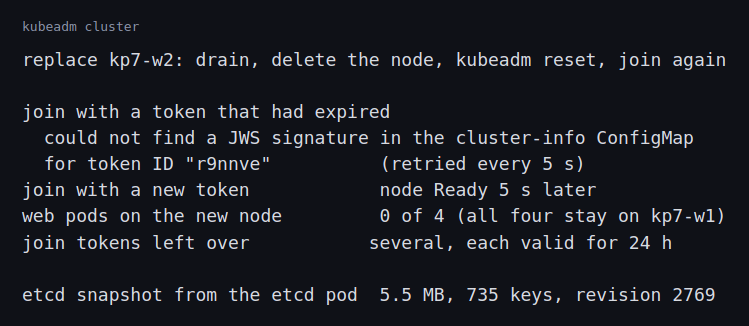 Image: the expired token, the new join, where the pods were afterwards, and the snapshot.
Challenges
- One control plane is one outage. The API was gone for the whole minute that the API server’s manifest was away, and it flickered and then dropped for 40 seconds across about two minutes of the control plane upgrade. The workloads kept running. Everything that needs the API, such as scaling, scheduling and
kubectl, did not. This is why production clusters have three or more control plane nodes, and why the upgrade is done one of them at a time. - A restarting API server can answer
Forbidden. A drain that the API server had no reason to refuse gotForbiddenright after the control plane upgrade, and then worked. A restart of the API server reproduced it: for a fraction of a second between refusing connections and working normally, a valid admin request was refused. Automation against a control plane that is restarting needs retries onForbiddenas well as on connection errors, and a wait for the API server to report ready before it starts. I added retries to the drain step of the upgrade playbook. - An expired join token looks like a network problem. The message names a missing signature and the command keeps retrying, which can look like a slow network. A token that was valid 24 hours ago is a common cause, and the other direction is the problem too: tokens from earlier joins stay valid for a day and anyone who holds one can join a node.
- A new node starts empty. The replacement was
Readyin five seconds and had no workloads. The scheduler only places new pods. Spreading the old ones takes a rollout, a descheduler or a deliberate drain of the busy nodes.
What this lab cannot show is how kubeadm behaves on hardware with real disks and networks, how it works with a load balancer in front of three control plane nodes, or how long an upgrade takes with hundreds of nodes. I built a single control plane. In the future I’m planning to purchase a hardware kit to help practice further.
Differences with a production setup
- Control plane. Production clusters run three or more control plane nodes behind a load balancer, with etcd on the same nodes or on its own. I ran one.
- Upgrades. The kubeadm upgrade procedure goes one minor version at a time, which is what I did, and one control plane node at a time. The version skew policy sets the limits.
- Cluster API. Many bare-metal fleets do not run kubeadm by hand. Cluster API describes clusters and machines as Kubernetes objects, runs kubeadm on the machines, and replaces machines with new ones for an upgrade, in place of upgrading them where they stand.
- Bare metal. Metal3 joins Cluster API to Ironic, which powers servers on through their BMCs and installs an image on them. That is the layer under the PXE and BMC posts. I did not run it.
- Join tokens. The kubeadm token documentation describes how to list, create and delete them. Production setups use short lifetimes, and make a token only when a node is joining.
- Certificates. kubeadm certificates last a year and the upgrade renews them, as in the kubeadm certificate documentation. Clusters that are never upgraded need a renewal job.
- Runtime and network. I used containerd as described in the container runtime documentation, and flannel for pods. Production clusters on bare metal often use Cilium, as in the earlier post.
- Machine images. Many fleets use images that already have the container runtime and packages, and replace machines for an upgrade. I installed the packages on each machine with Ansible.
- Backups. I took a snapshot by hand and left it on the node. Production setups copy it elsewhere on a schedule, as in the Kubernetes etcd documentation.
FAQ
Why does the control plane go first in an upgrade?
A kubelet can be older than the API server, and it cannot be newer. If a worker were upgraded first, its kubelet would be ahead of the API server.
Does an upgrade renew the certificates?
In the lab it did. The admin certificate’s expiry moved ahead when the control plane was upgraded.
What happens to the workloads when the API server stops?
They keep running. The web Service answered every probe while the API server was gone. Nothing could be scheduled or changed.
Why not upgrade the machines in place on a large fleet?
In place, each machine has its own history of changes. Replacing a machine with a new one from the same image makes every machine the same, which is what Cluster API does.
Repeating with real hardware
I would build three control plane nodes behind a load balancer on servers that came up through PXE, and time the upgrade one control plane node at a time. I would replace a failed node through the BMC and Ironic and not by hand, and I would keep the etcd snapshots on another machine and restore one on a new cluster.
Next
Take the quiz to test your understanding: Kubernetes quiz
That completes the core of this track. Storage and backups, logs and traces, and what lives under a pod are the topics I am considering next.
Comments