Goal
A Kubernetes cluster runs on certificates: the API server, the kubelets, etcd and the users from the previous post all authenticate with them, and every certificate expires. Secrets are the other half. By default the API server stores them in etcd as plain data. This post covers both. I wanted to run a private certificate authority inside the cluster with cert-manager and watch a certificate renew itself, find out what a running web server does when its certificate file changes, check and rotate the certificates that k3s makes for its own parts, and turn on encryption of secrets at rest on the three servers.
Terms used in this post
- Certificate: a signed statement that a public key belongs to a name. It has a start and an end date.
- Certificate authority (CA): the holder of a key that signs certificates. Anyone who trusts the CA trusts what it signed.
- cert-manager: a controller that asks an issuer for certificates, stores them in Secrets and renews them before they expire.
- Issuer: the cert-manager object that says who signs. A ClusterIssuer works in every namespace.
- Rotation: replacing a certificate or key with a new one.
- Secret: the Kubernetes object for small sensitive values, such as passwords, keys and certificates.
- Encryption at rest: the API server encrypts a secret before it writes it to etcd, so that the stored data is not readable without the key.
- Snapshot: a copy of the etcd data in one file, as in the HA post.
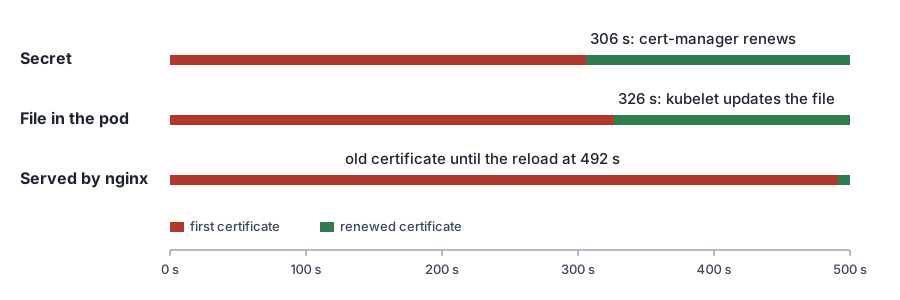 Diagram: the three places where the certificate is, over the 500 seconds I watched. Red is the first certificate and green is the renewed one.
What I built
The cluster has three k3s servers with embedded etcd and Cilium. I took a Proxmox snapshot of each VM first.
- cert-manager v1.21.3, installed through the k3s helm controller.
- A private CA. A self-signed root certificate, made by cert-manager, signs an issuer called
lab-ca. - A demo namespace with an nginx server on port 443, and a Certificate that cert-manager keeps in a Secret. The Secret is mounted into the pod as files.
- For the secrets test, one Secret with a known value,
hunter2-kp5, to search for in etcd snapshots.
How it works
cert-manager watches Certificate objects. For each one it makes a private key, sends a signing request to the issuer, and writes the signed certificate and the key into the Secret named in the Certificate. It records a renewal time, which is the end date minus a setting called renewBefore. When that time comes it repeats the steps and replaces the contents of the Secret.
A new certificate in a Secret does not change what a running program serves. The kubelet updates the files that a pod has mounted from a Secret. Whether the program notices depends on the program. Some programs read the file again on each connection, and some read it once when they start.
k3s makes its own certificates for the API server, the kubelets, etcd and the controllers. They are valid for 365 days. The k3s documentation says that certificates that are expired or within 120 days of expiring are renewed each time k3s starts. The CAs that sign them last much longer, ten years here.
Secrets encryption in k3s is switched on with a setting. k3s then makes a key, writes an encryption configuration and gives it to the API server. Only data written after that point is encrypted. The key has to be the same on every server.
Commands and results
A certificate that renews itself. I asked for a certificate with a duration of one hour and renewBefore of 55 minutes. One hour is the shortest duration cert-manager accepts, and the two settings make it renew five minutes after it is issued. I watched three things once every 20 seconds: the certificate in the Secret, the certificate in the file inside the pod, and the certificate that nginx serves, which I read with openssl s_client.
- At 306 seconds cert-manager renewed the certificate and the Secret held a new one.
- At 326 seconds the file in the pod had the new certificate, 20 seconds after the Secret.
- nginx went on serving the first certificate. I watched until 469 seconds and nothing changed.
- I ran
nginx -s reloadat 492 seconds, and then it served the new certificate.
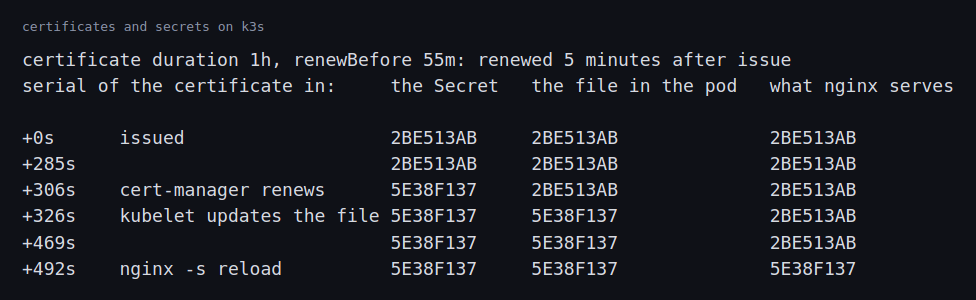 Image: the serial number of the certificate in the Secret, the file and the server, over time.
The first certificate would have expired an hour after it was issued. The renewal worked, and the server would still have presented an expired certificate until its next reload.
k3s’s own certificates. k3s certificate check listed the client and serving certificates of a server with about a year left, and the CAs with ten years. On lab-node2 I stopped k3s, ran k3s certificate rotate and started it again. The other two servers kept serving the API. Afterwards the expiry of every certificate on that node had moved to the same minute, a year from the rotation.
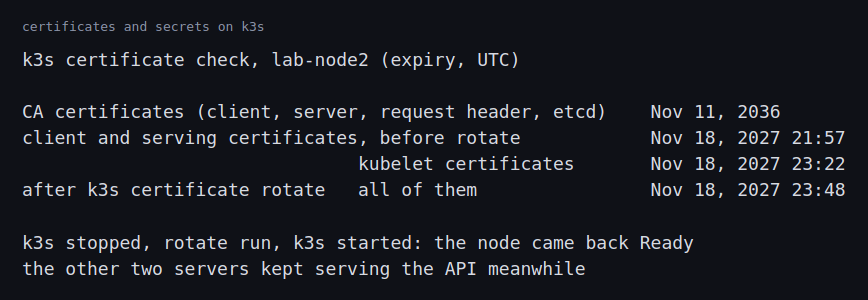 Image: the expiry dates before and after the rotation on one server.
Secrets at rest. I created a Secret with a known value and saved an etcd snapshot. The value appeared in the snapshot file in plain text, two times. Then I turned encryption on.
- k3s creates the encryption key on the server where the setting is first switched on. A server that turns the setting on by itself creates a different key and cannot read what the others wrote: its log filled with “failed to decrypt data” and “corrupt object”, and the node never became ready. All servers need the same encryption configuration and state file, copied from the first. With that,
k3s secrets-encrypt statussaid all hashes match. - With encryption on, a new snapshot held 6 encrypted secrets, and the old Secret was still in plain text. Turning encryption on does not rewrite what is already stored.
k3s secrets-encrypt rotate-keysrewrote every secret under a new key. The next snapshot held 59 encrypted secrets, and the API still returned the value.- A plain copy of the value was still in the snapshot file after the rotation. Reading the bytes around it showed the key of that Secret and the unencrypted storage format, not the encrypted one, so it was an earlier revision of the same Secret, which etcd keeps until it is compacted. A snapshot taken later, after I had deleted the test Secret, held the value zero times and 91 encrypted secrets. That later snapshot does not say whether the compaction or the deletion removed it.
- After
rotate-keysthe other two servers reported that their hashes did not match, andlab-node1logged more than 4000 decrypt errors in five minutes until I restarted both of them.
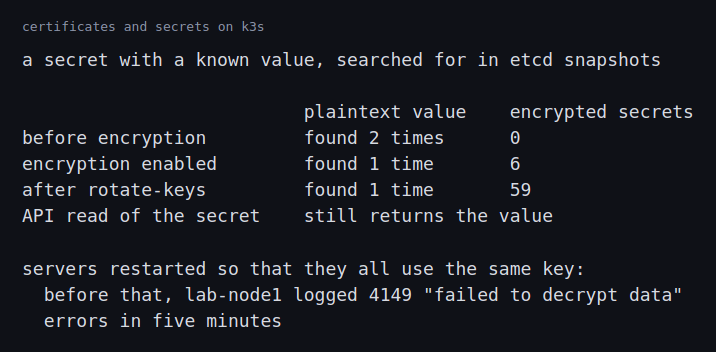 Image: how many times the plain value, and encrypted secrets, appeared in snapshots at each stage.
Challenges
- A renewed certificate does not reach a running server by itself. The Secret changed, then the file, and the server kept the old certificate. An hour-long certificate would have gone stale before the next reload. The usual fixes are a program that watches its files, a sidecar or controller that restarts pods when a Secret changes, or short-lived pods that restart often. This one needed a decision for each workload.
- Multi-server encryption needs one key everywhere. The setting looks like one line, but a server that enables it by itself makes its own key. A server with a different key cannot read the data of the others, and it stays unready. The key has to be distributed to every server before they restart.
- Key rotation needs restarts on the other servers. After
rotate-keys, the server that ran it used the new key and the others still had the old one. They could not read what had been re-encrypted until they restarted. Between the two there was a stretch of errors in the logs of a working cluster. - Enabling encryption does not protect what is already there. The existing secret stayed in plain text until the keys were rotated, and a copy of the value was still in the snapshot afterwards. The same is true of snapshots and disks that were written before encryption was turned on, including disk and VM snapshots.
- Certificates that last a year are easy to forget. The k3s certificates last a year. They renew at a k3s restart, and only once less than 120 days are left. A cluster that is never restarted in that window reaches the end date.
What this lab cannot show is how a fleet keeps hundreds of certificates from expiring, or what an expiry looks like to the workloads that depend on it. I watched one renewal. In the future I’m planning to purchase a hardware kit to help practice further.
Differences with a production setup
- Who signs. I made a private CA that exists only in this cluster. Production setups use their company’s CA, or a public one for names on the internet, and cert-manager supports both through its issuers. The CA’s own key then lives in a vault or a hardware module and not in a Secret.
- Distributing trust. A private CA only works if clients trust it. trust-manager distributes CA bundles to namespaces. I did not use it.
- Renewal settings. I used the shortest duration so that I could watch it. The Certificate documentation describes the settings, and production certificates usually last weeks or months with a renewal margin of days.
- Picking up new certificates. Tools such as Reloader restart workloads when a Secret or ConfigMap changes.
- Cluster certificates. k3s renews on restart. Clusters built with kubeadm have their own certificate management and renew with a command or on upgrade.
- Where the key lives. I used the key that k3s generates and stores on the server’s disk, which is what the k3s documentation describes. Production setups keep the key outside the cluster in a KMS provider, so that stealing an etcd snapshot is not enough to read the secrets. Kubernetes describes encryption at rest in general.
- Where secrets come from. Many setups do not keep secrets in the cluster’s own objects at all. External Secrets Operator copies them from a vault when needed.
- CA rotation. I rotated the leaf certificates. Replacing a CA is a larger operation. The k3s certificate command has a separate
rotate-casubcommand for it, and I did not run it.
FAQ
Does cert-manager restart my pods when it renews a certificate?
No. It updates the Secret. The file in the pod follows, and whether the program uses it depends on the program.
Why did the file in the pod change after the Secret?
The kubelet syncs mounted Secrets on an interval. In this run that took 20 seconds.
If I turn on encryption, are my old secrets encrypted?
Not until they are written again. Rotating the keys rewrites all of them.
Is an etcd snapshot as sensitive as the secrets in it?
Yes, until encryption is on and the secrets have been rewritten. A snapshot taken before that holds them in plain text.
Repeating with real hardware
I would put the root CA’s key in a hardware module or a vault and have cert-manager sign through an intermediate. I would wire the servers to reload their certificates and watch the expiry dates of every certificate in an alert. I would also keep the encryption key in a KMS and test restoring an etcd snapshot on a new cluster that has no access to the key.
Next
Take the quiz to test your understanding: Kubernetes quiz
The next post in this track writes an admission webhook and a small controller in Go.
Comments