Goal
The cluster from the previous posts uses flannel for pod networking and a small controller built into k3s for network policy. Pod networking in Kubernetes is the job of a CNI plugin, and the plugin also decides how much network policy can express. I wanted to replace flannel with Cilium on the three servers, check that a plain Kubernetes NetworkPolicy behaves the same, then use what Cilium adds: rules on HTTP requests and on DNS names, and Hubble, which shows each dropped connection. I also wanted to see what a DNS failure and a CNI failure look like from a pod.
Terms used in this post
- CNI plugin: the program the container runtime calls to give a new pod a network interface and an address.
- flannel: the CNI plugin k3s installs by default. It connects pods on different nodes with a VXLAN overlay.
- Cilium: a CNI plugin that connects pods and enforces policy with eBPF programs in the Linux kernel, with an agent on each node.
- eBPF: small programs that the kernel runs at network and system events. Cilium uses them to forward and filter packets.
- NetworkPolicy: the Kubernetes object that says which pods may talk to which. The cluster’s network plugin has to enforce it.
- CiliumNetworkPolicy: Cilium’s own policy object. It can match HTTP methods and paths and DNS names, which NetworkPolicy cannot.
- Envoy: a proxy. Cilium sends traffic through one on the node when a rule needs to read HTTP.
- Hubble: Cilium’s flow observer. It records each connection with the policy verdict.
- CoreDNS: the cluster’s DNS server. It turns a Service name into its address.
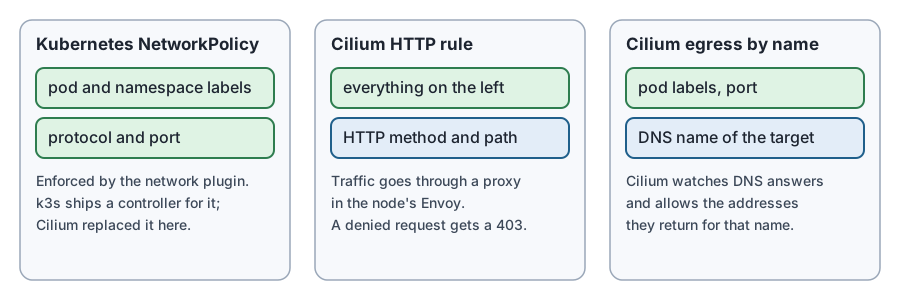 Diagram: the three policy kinds used below and what each can match.
What I built
The cluster has three k3s servers with embedded etcd, as in the previous post. I took a Proxmox snapshot of each VM first.
The test setup is a namespace with a web server on one node, and two client pods on another. One client is labelled role=frontend and the other role=other. Policies in this post allow the frontend and nothing else. I ran the same checks twice, once on flannel and once on Cilium.
Cilium 1.20.5 is installed through the k3s helm controller, with a HelmChart object. k3s was started with flannel-backend: none and disable-network-policy: true in its config file on all three servers. Cilium runs an agent and an Envoy proxy on every node, one operator, and a Hubble relay.
How it works
When kubelet starts a pod, the container runtime calls the CNI plugin. With Cilium, the plugin asks the Cilium agent on that node to create the pod’s network interface and to attach eBPF programs to it. Those programs forward packets to other nodes and apply policy to each packet. Policy is expressed in terms of identities derived from pod labels, not addresses, so a label change takes effect without rewriting address lists.
A network plugin has to be present before any pod can start. Kubernetes marks a node NotReady until the runtime reports a working network, and puts a taint on the node. Cilium adds a taint of its own, node.cilium.io/agent-not-ready, while its agent is not ready, so that the scheduler does not place new pods on a node with no network.
Commands and results
The switch. I wrote the two settings to the k3s config on each server, stopped all three with k3s-killall.sh, removed the flannel interfaces and started them again. The API answered 19 seconds after the start. The nodes stayed NotReady while the network plugin was missing, and the whole cluster restarted its pods.
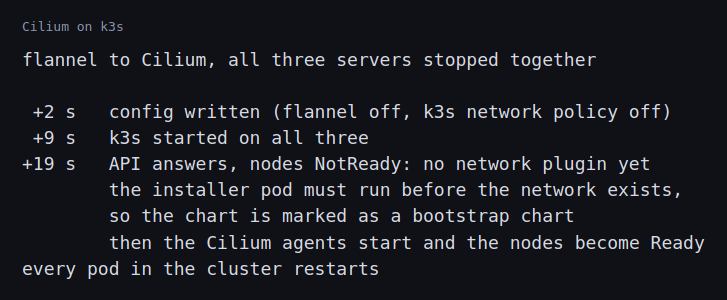 Image: the switch from flannel to Cilium.
The same policy on both plugins. The server’s namespace got a NetworkPolicy that denies all ingress, and a second that allows port 80 from pods labelled role=frontend.
- On flannel with the k3s controller, the frontend got a 200 and the other pod was blocked.
- On Cilium, the same two objects gave the same result.
HTTP rule. I replaced them with a CiliumNetworkPolicy that lets the frontend send GET / to the server and nothing else.
GET /returned 200.GET /index.htmlreturned 403 Forbidden, and so did aPOST /.- The other pod’s request timed out, because it was not allowed to connect at all.
A NetworkPolicy cannot say this. It stops at the port, and the 403 is the proxy answering on the server’s behalf.
Egress by name. First I confirmed the frontend could reach two outside web sites, example.com and example.org. Then I applied a CiliumNetworkPolicy for the frontend’s egress. It allows DNS to CoreDNS, the web port to example.com by name, and the server inside the cluster. After that, example.com and the server still answered, and example.org was blocked. A name rule is useful for outside services whose addresses change. It needs the DNS rule, because Cilium learns the addresses from the DNS answers it sees.
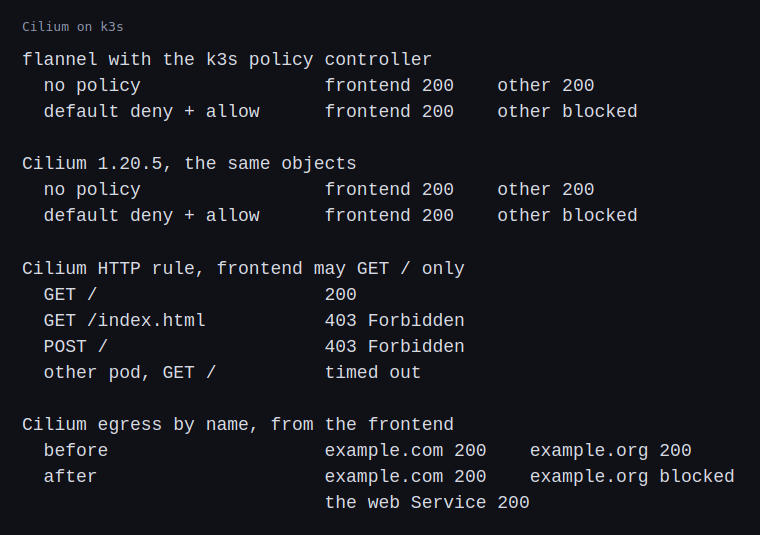 Image: the results of each policy, on flannel and on Cilium.
Hubble. On the node of the server, hubble observe --verdict DROPPED showed the other pod’s connection attempts, with the policy denial and the TCP flags.
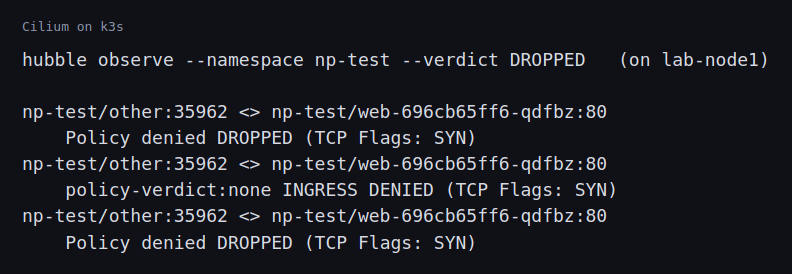 Image: three Hubble lines for the blocked pod.
Footprint. kubectl top showed the three agents at 114 to 130 MiB each, the three Envoy proxies at about 16 MiB each, the operator at about 60 MiB and the Hubble relay at about 18 MiB. That is about 480 MB for the cluster.
CoreDNS down. I scaled CoreDNS to zero. From the frontend, http://web/ failed with “bad address”, while the server’s pod address still returned 200. The failure is in name resolution only. After CoreDNS came back, the name worked again.
Cilium agents down. I stopped every agent by giving the DaemonSet a node selector that matches nothing. The agents were gone in 3 seconds.
- All three nodes got the
node.cilium.io/agent-not-readytaint. - The frontend still reached the server, so pods that already run keep their connectivity.
- A new pod sent through the scheduler stayed Pending, with “3 node(s) had untolerated taint(s)”.
- A new pod with
nodeNameset skips the scheduler. It stayed inContainerCreating. - When I allowed the agents back, both pods were running 15 seconds later.
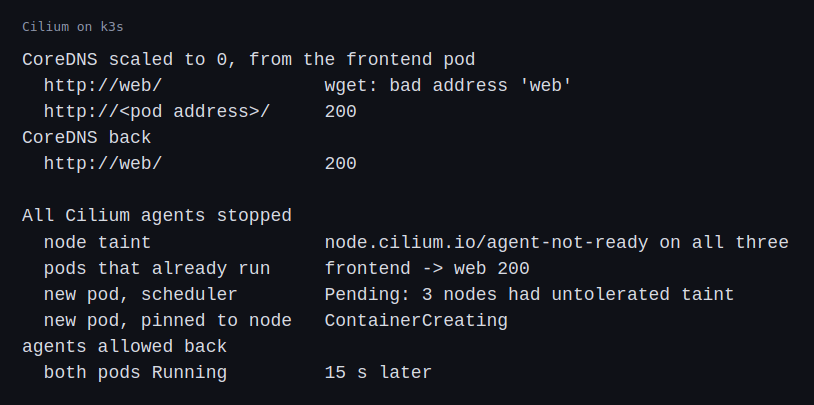 Image: what the pods saw with CoreDNS down and with the agents down.
Challenges
- Switching the network plugin restarts everything. The three servers had to be stopped together and started with the new setting, because the other choice was a cluster with two network plugins at once. Every pod in the cluster restarted, and the nodes stayed
NotReadyuntil the new plugin was running. On a real cluster the plugin is chosen when the cluster is built. - The installer could not start because there was no network. The chart’s install job is a pod, and the nodes carried the not-ready taint that the missing plugin causes. The job stayed Pending. k3s has a field for this case,
bootstrap: trueon theHelmChart, which lets the job run before the cluster has a working network. With it, the installer ran at once. A network plugin has to be installable by something that does not itself need a network. - A policy that is not enforced looks like a policy that works. The first thing to check after changing the plugin is a connection that must fail. The other pod being blocked was the evidence, and Hubble showed the reason.
What this lab cannot show is how Cilium behaves at the size of a real cluster, or with thousands of policies. In the future I’m planning to purchase a hardware kit to help practice further.
Differences with a production setup
- Choosing the plugin. Production clusters pick the network plugin when the cluster is created. I changed it on a running cluster, which is why every pod restarted.
- Alternatives. Calico is the other plugin that is widely used for policy. I did not try it.
- Policy writing. The Cilium policy language has more rules than I used. Production setups usually start every namespace from a default deny, as the Kubernetes documentation on network policies describes, and keep the policies in git.
- kube-proxy. I left k3s’s kube-proxy in place. Cilium can replace it. I did not test that.
- BGP. Production setups on bare metal announce Service and pod addresses to the physical network. Cilium has a BGP control plane for that. I did not run it.
- Secondary networks. AI clusters give pods extra interfaces for fast networks. Multus attaches more than one network to a pod, and the SR-IOV network operator handles virtual functions on supported cards. I did not use either.
- Observability. I read Hubble flows on the command line. Production setups export Hubble metrics to Prometheus and alert on drops.
- DNS. The Kubernetes guide to debugging DNS lists the checks that I did here in the simplest form.
- Networking in k3s. The k3s network options page lists the flags used to turn flannel off.
FAQ
Does a NetworkPolicy work with any network plugin?
No. The plugin has to enforce it. A plugin that does not will accept the object and ignore it, so test with a connection that has to fail.
Why did the 403 come back instead of a timeout?
For an HTTP rule, the traffic goes through a proxy that reads the request. A denied request gets an answer from the proxy. A connection that the policy does not allow at all never gets that far, and it times out.
Do running pods lose their network when the Cilium agent stops?
In the drill they kept their connectivity. New pods on that node could not start, and the taint kept the scheduler from sending any.
Why does the egress rule by name need a DNS rule?
Cilium learns which addresses belong to the name by reading the DNS answers. Without the DNS rule it would not see them.
Repeating with real hardware
I would build the cluster with Cilium from the start, on servers with at least two network cards, and test the BGP announcements against the real switch. I would also run the same blocked and allowed checks from a pod on every node, and time the policy update across a few hundred pods.
Next
Take the quiz to test your understanding: Kubernetes quiz
The next post in this track covers access: roles, quotas and isolation between tenants.
Comments