Goal
So far I was the only user of the cluster and I used the admin credentials for everything. A shared cluster has several teams, and each team should be able to run its own workloads without seeing, changing or starving the others. This post sets up two tenants, tenant-a and tenant-b, each with its own namespace and its own user, and then checks the boundaries from the tenant’s side: what is allowed, what is refused, how much each tenant may use, and what the audit log records.
Terms used in this post
- Tenant: a team or customer that shares the cluster with others. Here, one namespace per tenant.
- Namespace: a named scope for objects. Names only need to be unique inside one.
- RBAC: role-based access control. A Role lists permitted verbs on resources, and a RoleBinding gives a Role to users or groups in one namespace.
- ClusterRole: a Role that is defined cluster-wide. A RoleBinding can still use it and limit it to one namespace.
- Client certificate: a certificate that a user presents to the API server. The common name is the user, and the organization is the group.
- ResourceQuota: a cap on what a namespace may use in total.
- LimitRange: defaults and bounds for each container in a namespace.
- Pod security admission: a check at pod creation that refuses pods that break a named level, such as
baseline. - Audit log: a record of each request to the API server, with who made it and what the answer was.
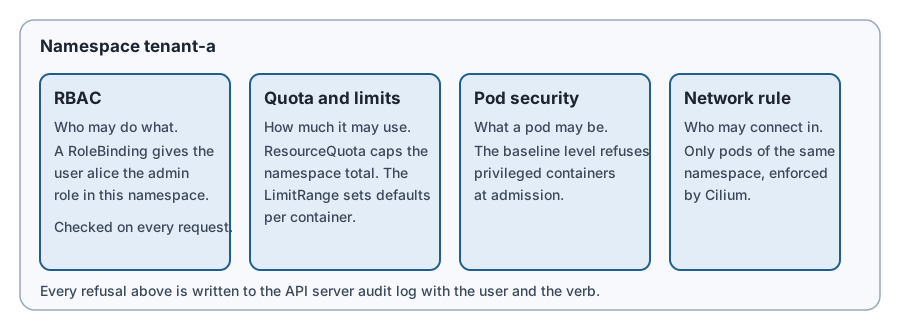 Diagram: who may act, how much it may use, what a pod may be, and who may connect in.
What I built
First I turned on the API server’s audit log on all three servers, one at a time, with the same rolling restart as in the HA post. The policy records every request at metadata level, so each line says who, what and the result, and leaves out the constant reads by nodes and service accounts.
Then I created the tenants:
- Two namespaces, each labelled to enforce the
baselinepod security level. - A ResourceQuota in each: 500 millicores of requested CPU, 512 MiB of requested memory, 8 pods and 10 secrets.
- A LimitRange in each, giving every container a default request of 50 millicores and 32 MiB and a default limit of 100 millicores and 64 MiB.
- A NetworkPolicy in each that only lets pods from the same namespace connect in. Cilium enforces it, as in the previous post.
- Two users,
aliceandbob. Each has a certificate issued through the Kubernetes certificate signing API, with the tenant as the group. A RoleBinding gives each the built-inadminrole in their own namespace and nowhere else.
How it works
When a request reaches the API server it goes through three steps. Authentication decides who the caller is. Here that is the certificate’s common name. Authorization decides whether that user may do this verb on this resource in this namespace. RBAC answers that by looking for a binding. Admission then runs checks and defaults on the object itself, which is where pod security, the LimitRange and the quota are applied.
A RoleBinding to a ClusterRole gives the permissions of that role only inside the binding’s namespace. So the same built-in admin role is safe to hand to a tenant. Kubernetes also stops a user from granting more than they hold. That check is built into RBAC.
Commands and results
What alice can do. From her kubeconfig, alice could list pods in tenant-a. Listing pods or secrets in tenant-b was Forbidden, and so was listing nodes or namespaces, which are cluster-wide. kubectl auth can-i said yes to creating Deployments in tenant-a and no in tenant-b.
Granting more. alice tried to give herself cluster-admin with a RoleBinding. It was refused with “attempting to grant RBAC permissions not currently held”. Giving the view role to a colleague in her own namespace worked, because she holds what she was giving away.
Revoking. I deleted alice’s RoleBinding. Her certificate was still valid, so she was still authenticated, but every request was Forbidden. Putting the binding back restored access. Kubernetes has no certificate revocation list, so removing the binding is how access ends, and the certificate itself only stops working when it expires. I issued these for one day.
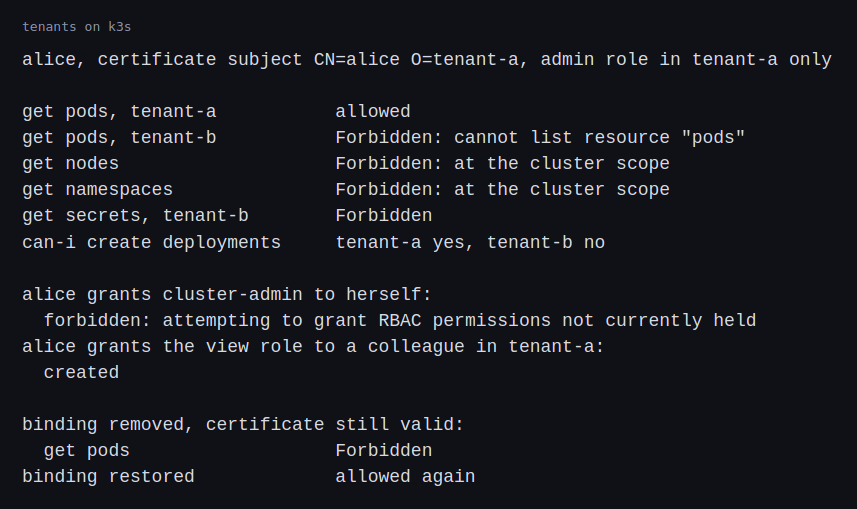 Image: alice’s requests, the escalation attempt and the revocation test.
Quota. alice created a Deployment of 10 pods, each asking for 100 millicores. Five pods ran. The quota allows 500 millicores, and the ReplicaSet reported exceeded quota: tenant-quota, requested: requests.cpu=100m, used: requests.cpu=500m, limited: requests.cpu=500m. The quota stopped the tenant, not the node.
Default sizes. A pod created without any resources got the LimitRange defaults: a request of 50 millicores and 32 MiB, and a limit of 100 millicores and 64 MiB.
Pod security. A privileged pod was refused with violates PodSecurity "baseline:latest": privileged.
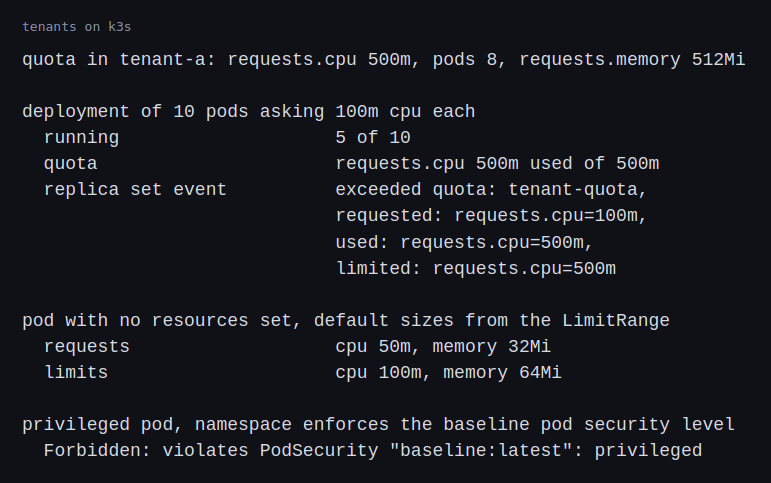 Image: the quota run, the defaults and the pod security refusal.
Network isolation. A client in tenant-a fetched the tenant-a web server and got a 200. A client in tenant-b fetching the same server through its cluster name timed out.
 Image: the same server fetched from both tenants.
Audit log. On the first server, the audit log held each refused request by alice: the pod, node and secret lists, the role binding she tried to create, a pod refused by the quota and the privileged pod. Each line has the time, the user, the group, the verb, the resource, the namespace, the status code and the message. All of them are 403, whether RBAC, the quota or pod security refused them, so the message is what says which control did.
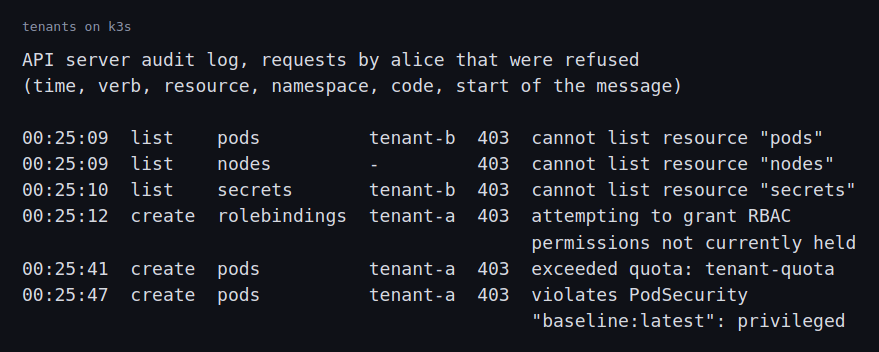 Image: alice’s refused requests as the audit log recorded them.
Challenges
- Quota counts pods that are still terminating. After I deleted the Deployment, new pods in the namespace were refused for a short time, because the old pods still held the quota while they shut down. A tenant that deletes and recreates a workload quickly can hit its own limit.
- Each API server has its own audit log. There are three servers, and each writes a file on its own disk. A request is recorded on the server that handled it.
alice’s kubeconfig points at the first server, so her requests were all in that file. A request through another server would be in another file. In a real cluster the logs go to one place, and I did not do that here. - Every refusal is a 403. RBAC, the quota and pod security all answer with the same status code. A search of the audit log for 403 finds all three, and only the message separates them. An alert on refusals has to read the message, or it will mix a tenant that is over its quota with one that is probing for access.
- Access outlives the certificate until the binding goes. Removing a user means removing every binding that names them, in every namespace. Certificates that run for days make that list the only record of who still has access.
What this lab cannot show is how tenants compete on a loaded cluster. I tested the boundaries one at a time, from a single tenant. I did not run two tenants at full load or measure how one tenant’s burst affects the other. In the future I’m planning to purchase a hardware kit to help practice further.
Differences with a production setup
- Identity. I made users with client certificates. Production setups use OpenID Connect with the company’s login system, so access follows the person’s group membership and ends when they leave.
- Multi-tenancy design. The Kubernetes multi-tenancy guide describes the range from separate namespaces on one cluster to a cluster for each tenant. Namespaces share a kernel, the control plane and the nodes, so they are a soft boundary. Projects such as Capsule manage many tenant namespaces as one unit, and vcluster gives each tenant its own virtual control plane.
- Nodes. I did not separate tenants onto their own nodes. Taints and tolerations, as in the Kubernetes post, reserve nodes for a tenant.
- Fair sharing. A ResourceQuota is a hard cap. Kueue shares capacity between tenants by queue and lets one borrow another’s unused share.
- Policy. I used the built-in pod security levels. Production setups add admission policy such as Kyverno for rules the built-in levels do not cover.
- Audit. The auditing documentation covers log backends and webhooks. Production setups ship the logs off the control plane and alert on patterns such as repeated refusals.
- RBAC and quotas. The RBAC reference, resource quotas, limit ranges and pod security admission pages describe the options I used and the ones I left out. The certificate signing request page describes how I issued the user certificates.
FAQ
Does a RoleBinding to the admin ClusterRole give a tenant admin rights on the cluster?
No. A RoleBinding limits the role to its own namespace. The same role in a ClusterRoleBinding would apply everywhere.
Why could alice grant the view role but not cluster-admin?
Kubernetes only lets a user grant permissions that the user already holds. Alice holds view in her namespace, and she does not hold cluster-admin.
Is a namespace a security boundary?
It is a boundary for names and for what RBAC, quota and network rules attach to. Pods in different namespaces still share nodes and a kernel. A tenant that needs stronger separation needs its own nodes or its own cluster.
Why did only five pods run?
The quota caps requested CPU at 500 millicores and each pod asked for 100.
Repeating with real hardware
I would connect the cluster to the company’s login system and give tenants groups, not individual users. I would then run both tenants at full load on the same nodes and measure the effect each has on the other’s latency. I would also send the audit logs of all three servers to one place and write an alert for repeated refusals from one user.
Next
Take the quiz to test your understanding: Kubernetes quiz
The next post in this track covers certificates and secrets.
Comments